
Opening soonThe Station Dashboard opens to stations shortly, with a 30-day free trial.

Register interest

Station Dashboard & crew app

Keep every station crewed and ready to respond.

iOnCall gives station admins and line managers a live view of availability, crewing and callouts, and gives every crew member an app that alerts them through silent mode.

Opening soon30-day free trialFrom £1 per active crew member

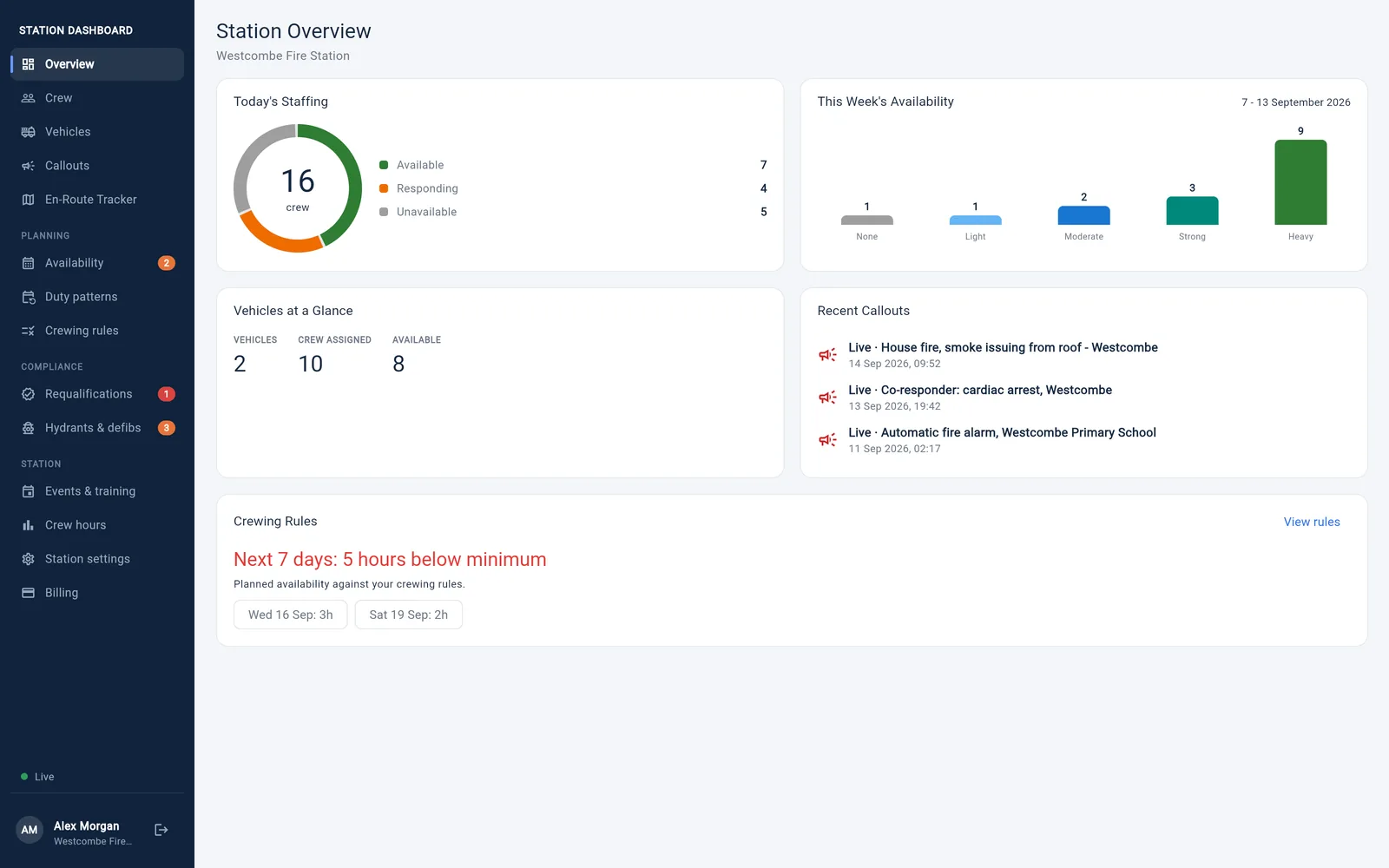
The Station Dashboard overview for a fire station: today's staffing of 16 crew with 7 available, 4 responding and 5 unavailable, last week's availability, vehicles, recent callouts and hours below the crewing rules
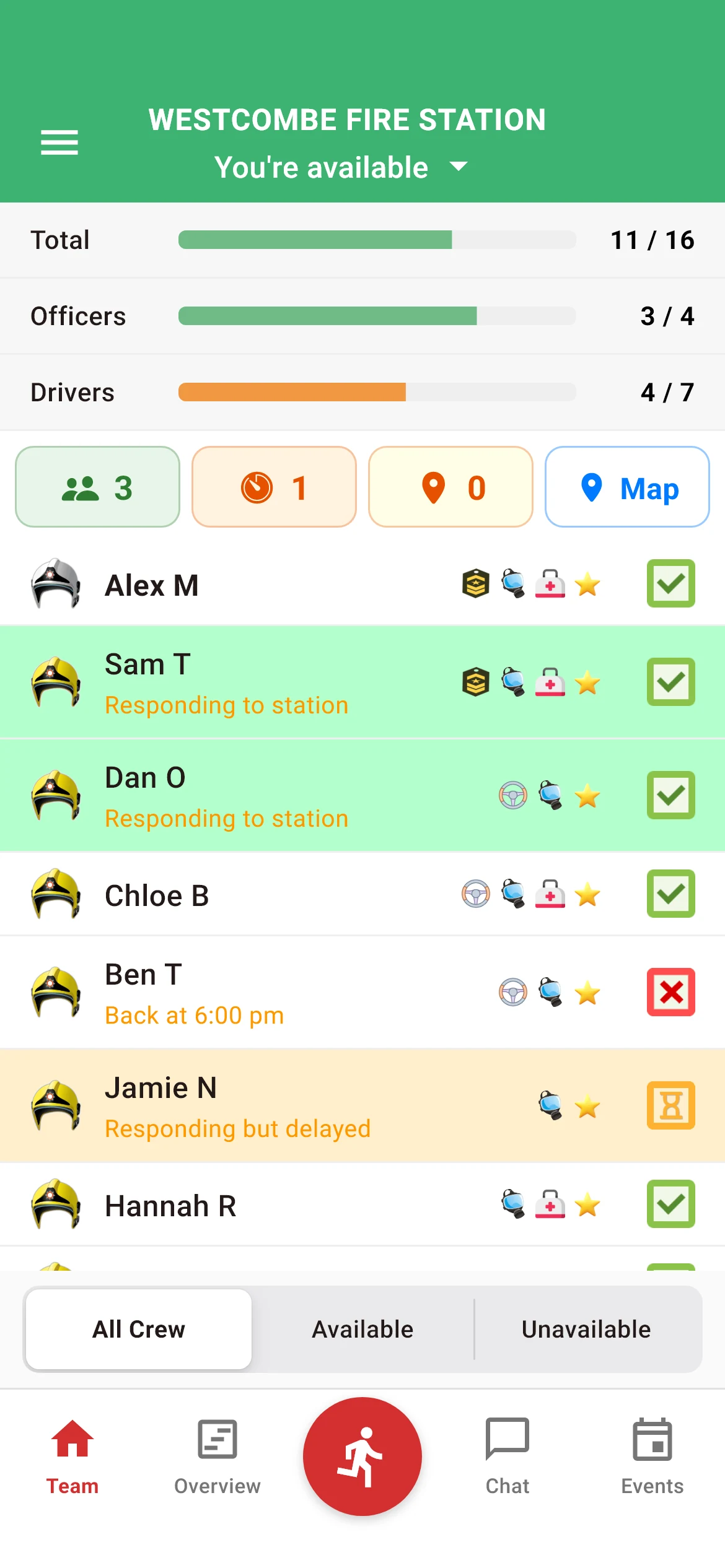
The iFire app on a phone: the station's crew levels, who is responding and each member's status
  • Alerts that cut throughsilent mode and Do Not Disturb
  • Callouts never lockedby billing, whatever happens
  • Hosted in the UKon Amazon Web Services, London
  • Built by responderswho use it on every callout

One platform

Two tools. One live picture of your station.

The Station Dashboard is where the station is run. The crew app is how every responder stays part of it. Both work from the same data and update live.

Station Dashboard

Plan, crew and run the station

For station admins and line managers, on any computer or tablet.

  • Availability planned hour by hour, up to 12 weeks ahead
  • Crewing rules, with alerts when crewing drops below them
  • Callouts, stand downs and a log of who responded
  • A live en-route tracker for crew on their way in
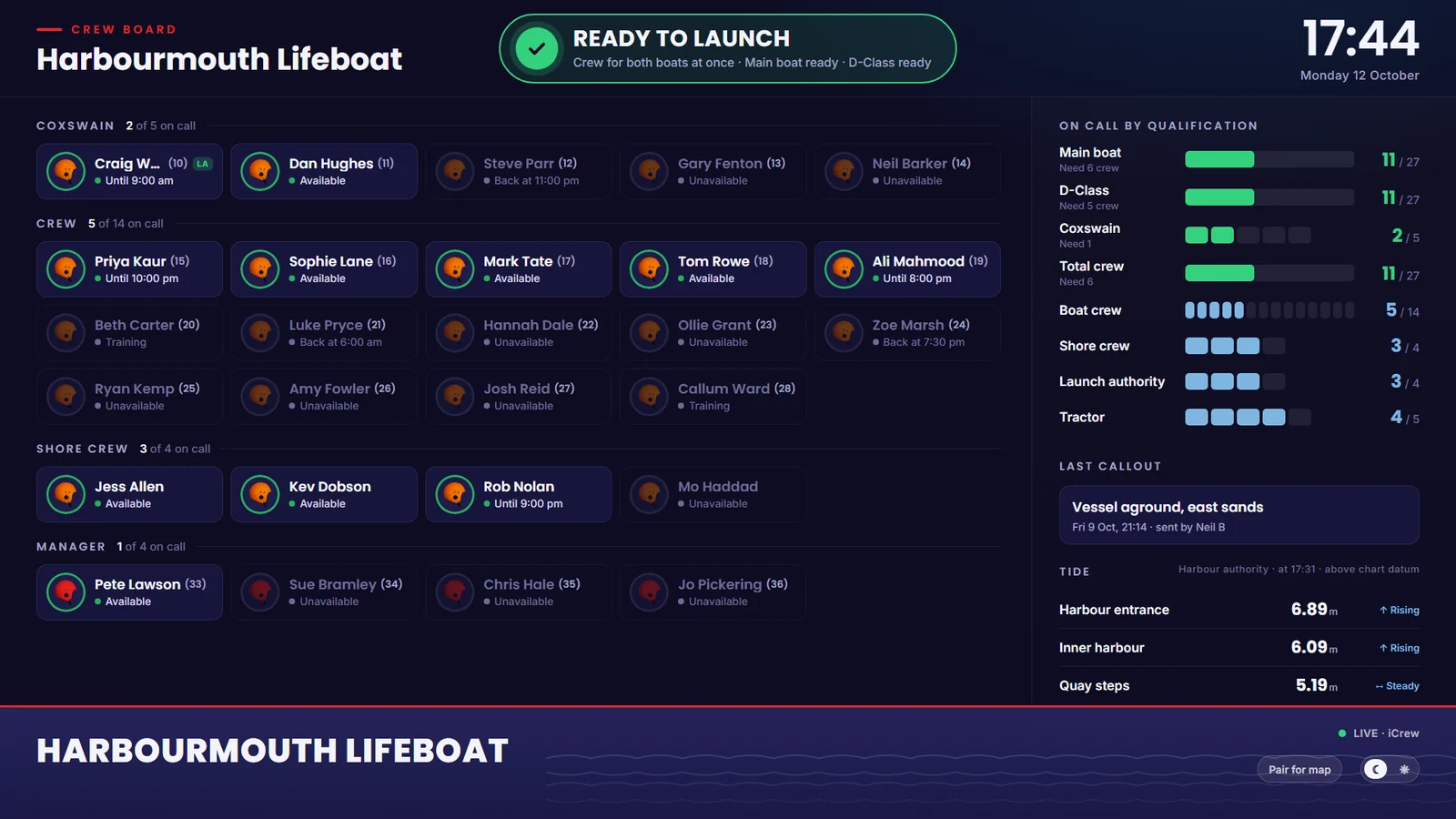
  • A crew board for the crew-room TV, live through every callout
  • Crew, vehicles, events, crew hours and billing in one place
Tour the dashboard

Crew app

Available, alerted and responding

For every crew member, on iOS and Android.

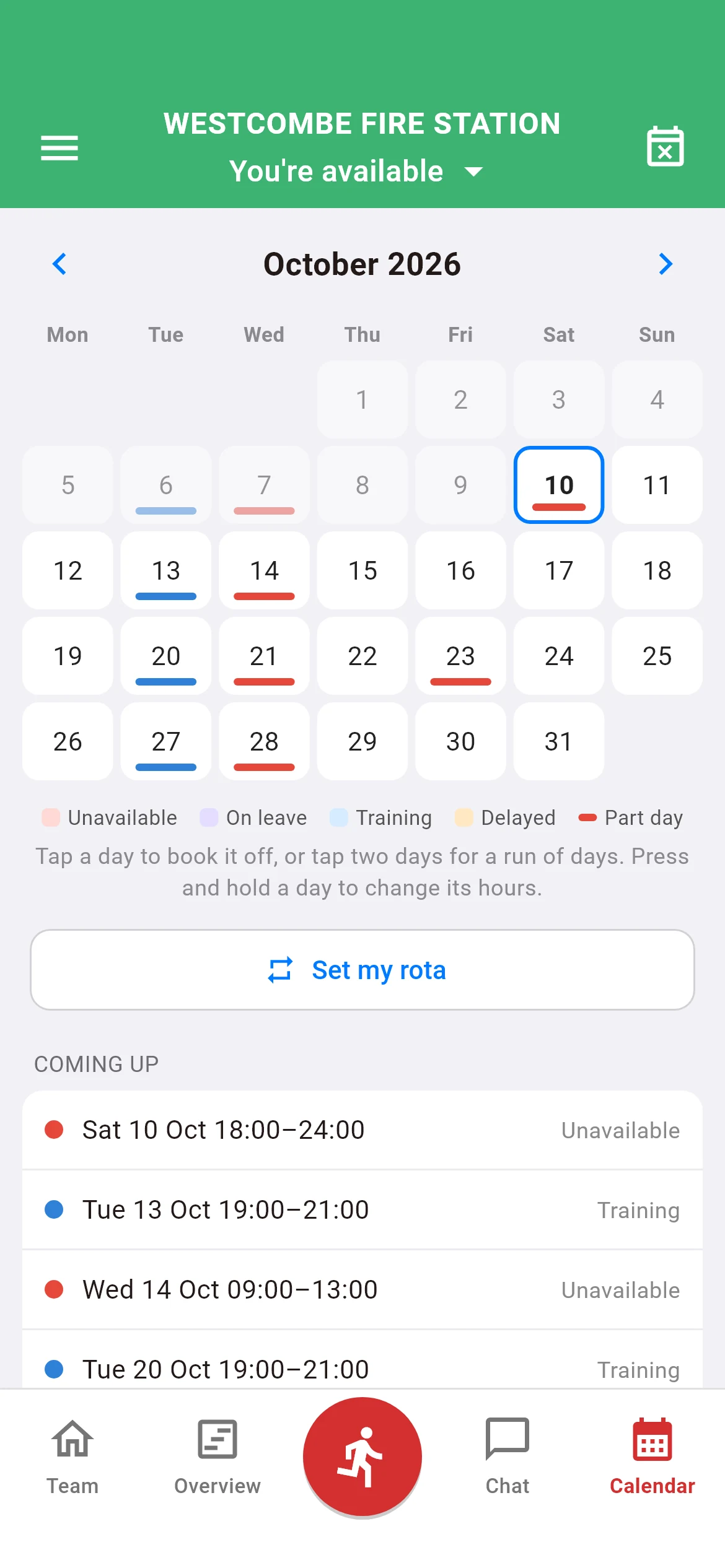
  • Book on and off in a tap
  • Mobilisation alerts through silent mode
  • Responding status the whole crew can see
  • Hydrants and defibrillators mapped nearby, in iFire and iRescue
See the crew app
  1. 01

    Plan

    Admins set crewing rules and duty patterns. Crew keep their availability up to date from the app.

  2. 02

    Alert

    When a callout goes out, mobilisation alerts sound on every crew member's phone, even on silent.

  3. 03

    Respond

    Crew tap to respond. The dashboard shows who is coming in, and how far away they are.

  4. 04

    Review

    Every callout, who answered it and when it was stood down stays on record for the station.

The Station Dashboard

Run the whole station, not just the callout.

A full web application for station admins, line managers and crew, on any computer or tablet. Plan availability weeks ahead, stay on top of crewing and qualifications, and see every callout as it happens.

The Station Dashboard overview: today's staffing, this week's availability, vehicles at a glance, recent callouts and hours below the crewing rules

The station at a glance

Today's staffing, the week's availability, your vehicles and the latest callouts on one screen, updating live.

  • Available, responding and unavailable crew, right now
  • Hours below your crewing rules over the next seven days
  • The latest callouts, with their date and time
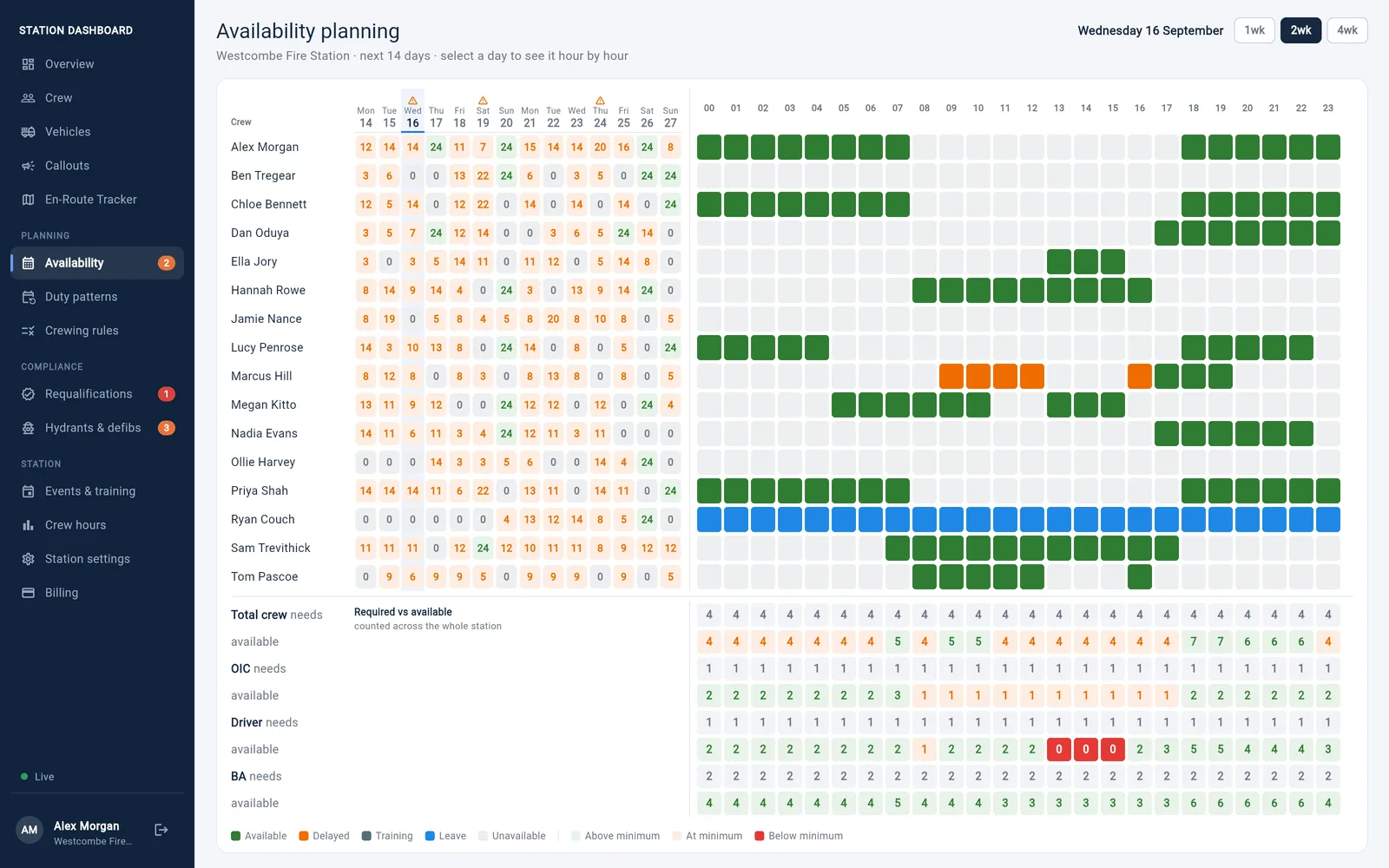
The availability planner: a multi-week grid of crew availability with low-crew hours highlighted

Plan availability weeks ahead

See every crew member's availability hour by hour, up to 12 weeks ahead, and fix a gap on Tuesday before Tuesday arrives.

  • Low-crew hours flagged against your crewing rules
  • Line managers update availability for the crew who chose them
  • Duty patterns apply a regular rota in a couple of clicks
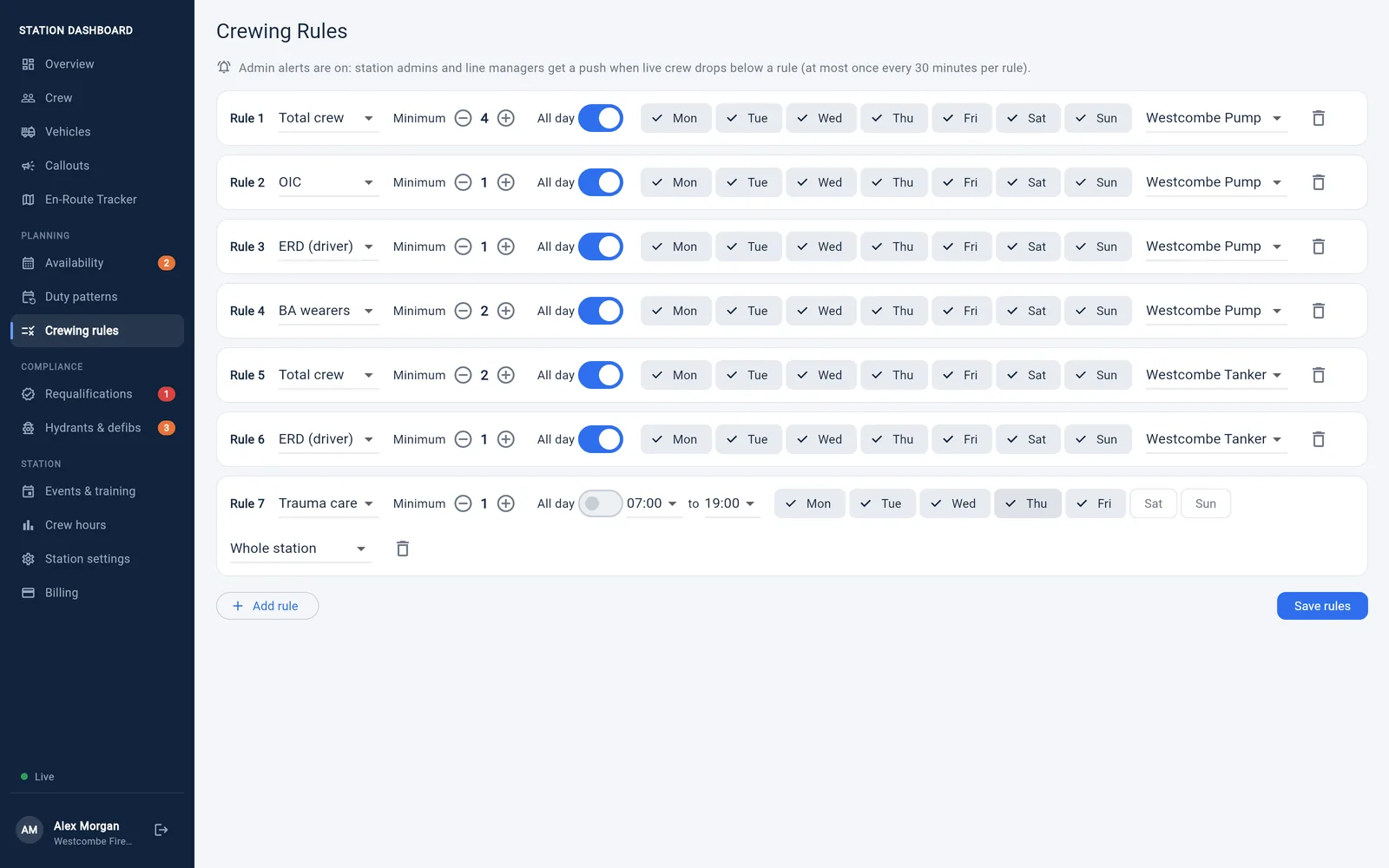
Crewing rules: a card for each appliance with its minimum crew, officers in charge, drivers and breathing apparatus wearers, a station-wide rule for busy weekend evenings, and the station's role ladders and names for roles

Crewing rules and low-crew alerts

Tell the dashboard what each appliance or boat needs to go out, all day or at set times: officers in charge, drivers and BA wearers for a fire station; coxswains, boat crew, shore crew and tractor drivers for a lifeboat.

  • A card for each appliance or boat, plus rules for the whole station
  • Role ladders: a coxswain also counts as boat crew, so you tick only each person's highest role
  • Your station's own names for roles, shown on profiles, rules and the crew board
  • Admins and line managers get a push when live crewing drops below a rule
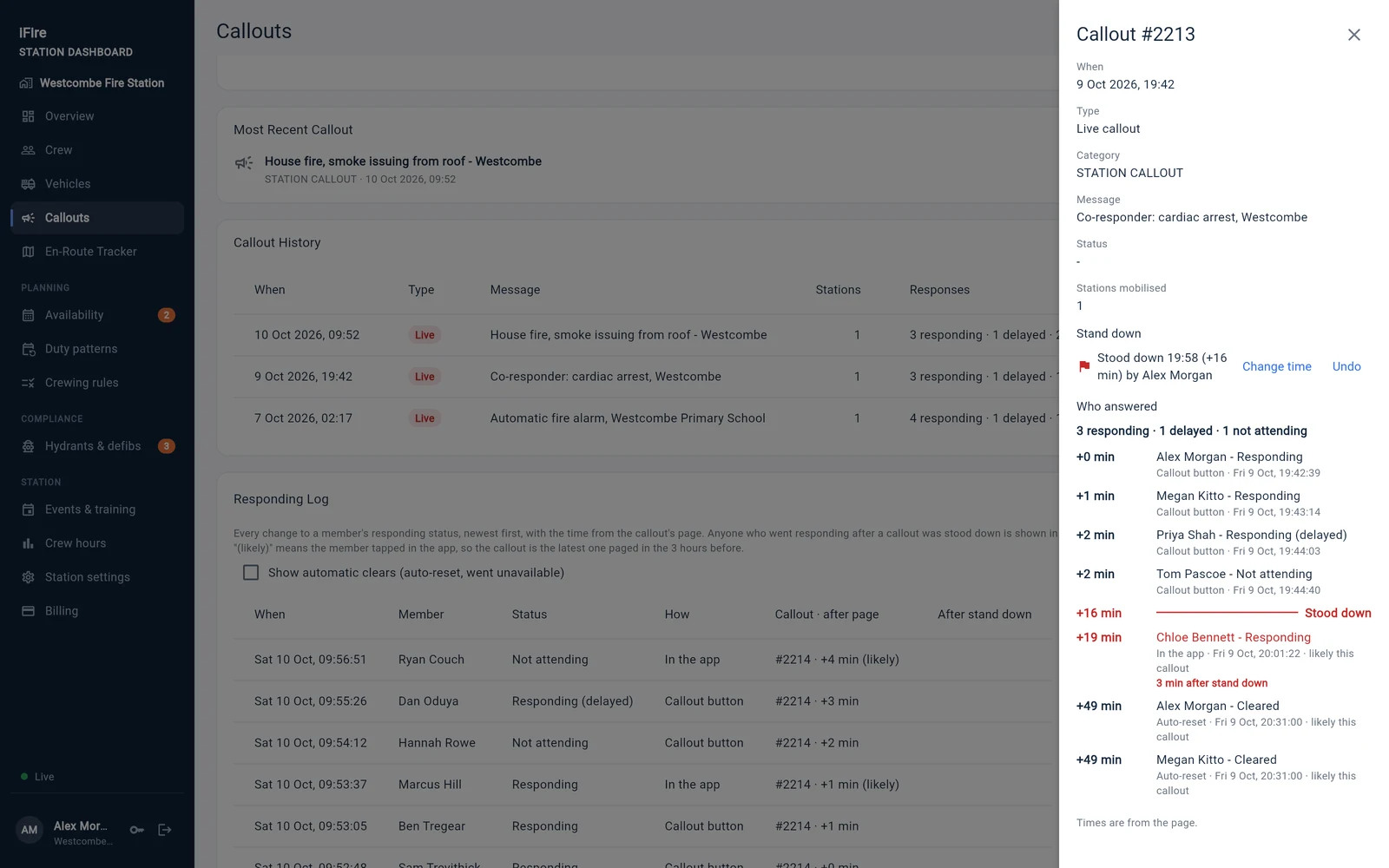
A callout opened on the dashboard: who answered and how many minutes after the page, the stand down marked on the timeline, and a crew member who went responding after it shown in red

Every callout, on the record

Send a test or live callout from the dashboard, see who answered and how quickly, and stand it down when the job is over.

  • Responding, delayed and not attending, counted for every callout
  • A responding log with the minutes after the page for each answer
  • Stand a callout down, and the crew get a "Stood down" message
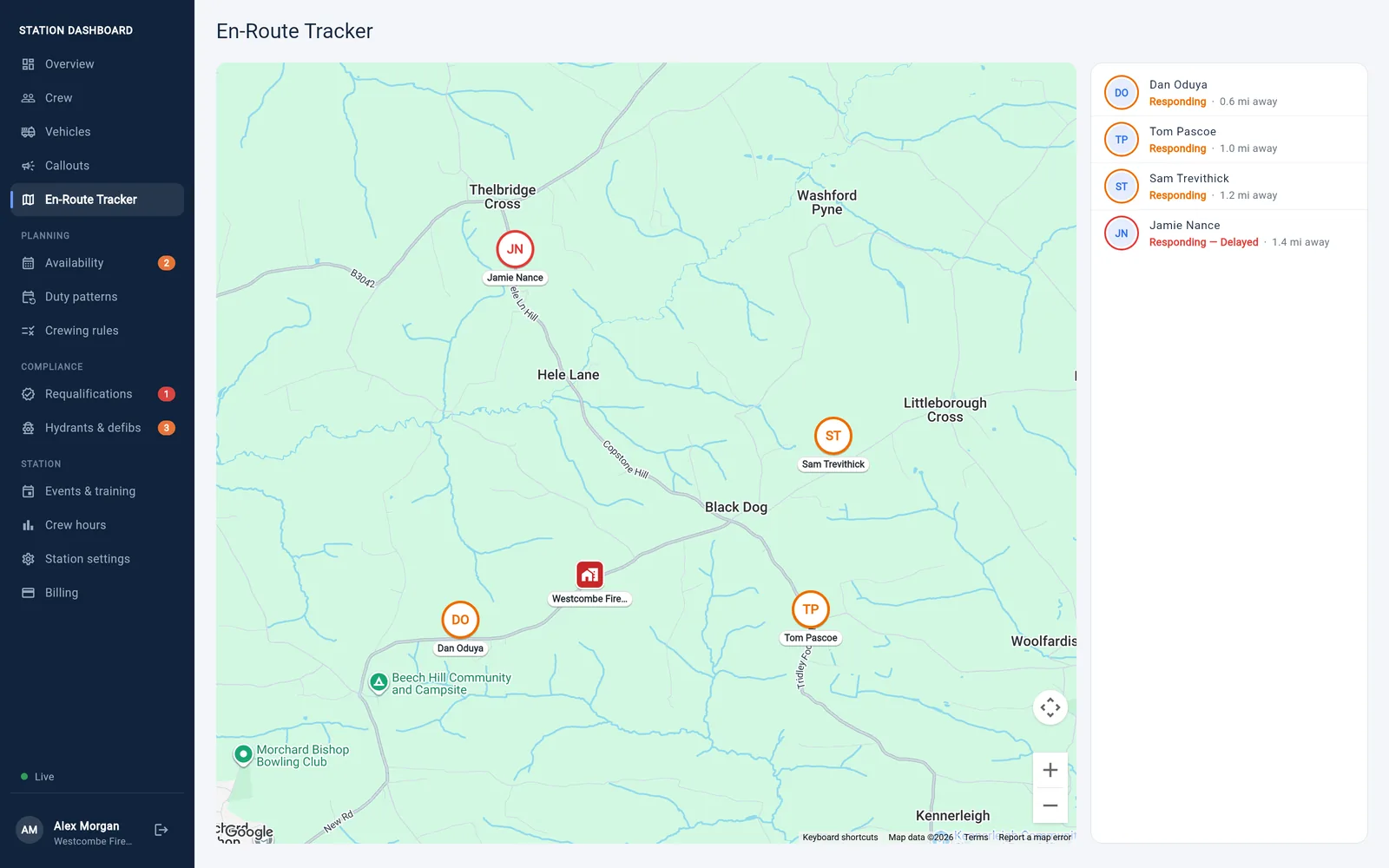
The en-route tracker: crew responding to a callout shown on a live map on their way to the station

Watch the response form

The moment a crew member taps to respond, they appear on a live map on their way in.

  • See who's responding the moment they tap
  • Follow responding crew on their way in
  • How far each responder is from the station
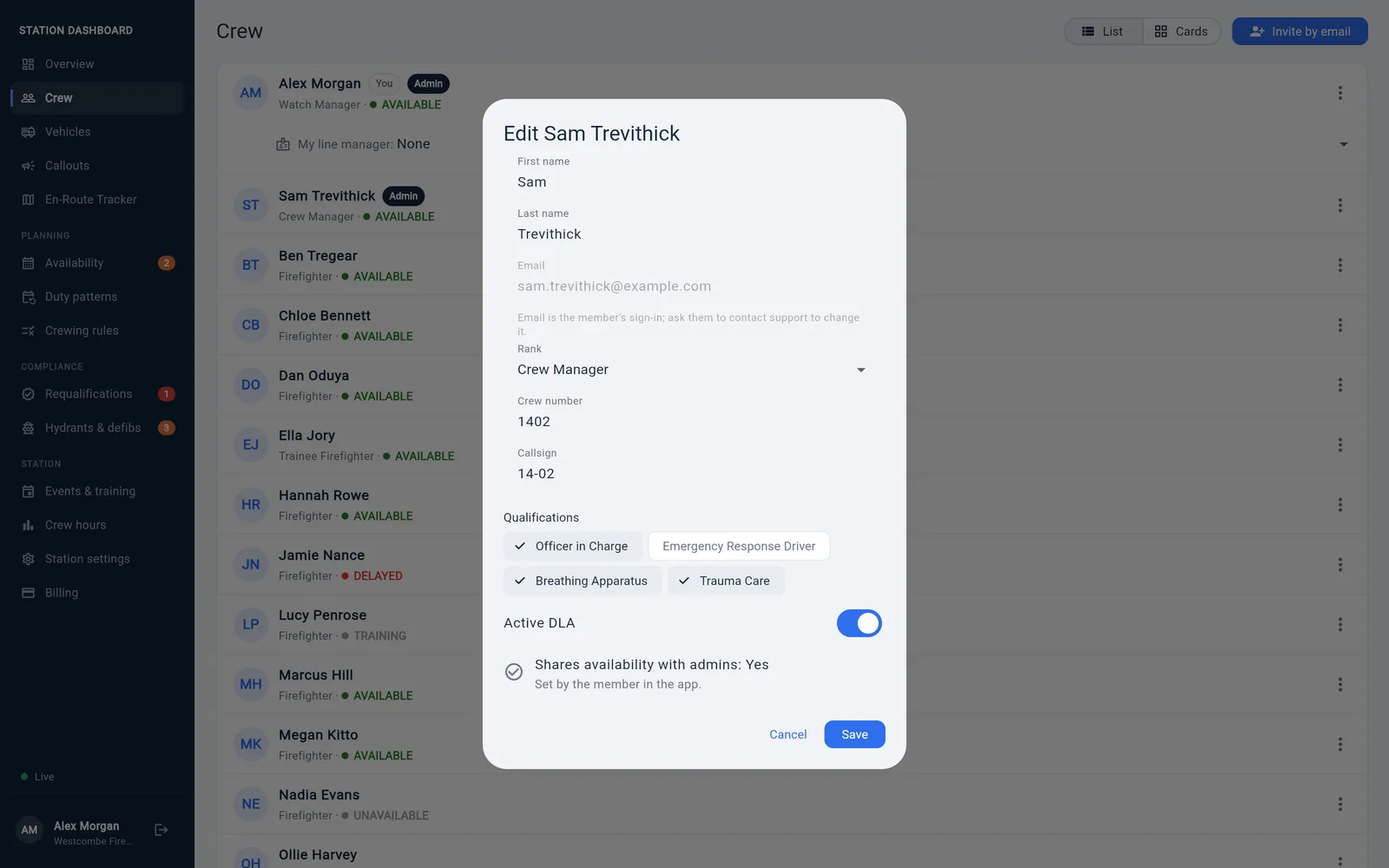
Editing a crew member's profile on the dashboard: rank, crew number, callsign and qualifications

Your crew, managed properly

Ranks, qualifications, callsigns and admin rights are set on the dashboard, so the details your crewing depends on stay right.

  • Invite new crew by email, with a link to accept
  • Each member can choose a line manager to help with their rota
  • Your availability history is yours: only you and the line manager you choose can see it
Also included
  • Vehicles & crew assignment
  • Crew-room TV board
  • Duty patterns
  • Leave & courses
  • Events & training nights
  • Crew hours & CSV export
  • Hydrant & defib moderation
  • Switch between stations
  • Your station logo in the app
  • Crew app defaults, set by the station
  • Sign in with a password or a code
  • Online billing

Everyone gets a login.

Access follows responsibility, so people see what they need and change only what they should.

Crew members

See and update your own information from any computer, as well as from your phone.

Line managers

Chosen by each crew member. Everything crew can do, plus viewing and updating availability for the crew who chose you.

Station admins

Run the station: profiles, ranks, qualifications, crewing rules, vehicles, callouts and billing.

Try the demo.

Sign in to a made-up fire station, Kilbrook, as an officer, a line manager or a firefighter, and see for yourself what each one can and can't see.

The station and its crew are fictional and rebuilt every night. Sending callouts, invites, billing and changes to people are switched off. Open it on a computer or tablet: the dashboard isn't available on phones.

Open the demo dashboard

  • Officerofficer@demo.ioncall.app
  • Line managerlinemanager@demo.ioncall.app
  • Firefighterfirefighter@demo.ioncall.app
  • PasswordKilbrook-Demo-26

The Crew board

Your station, live on the crew-room TV.

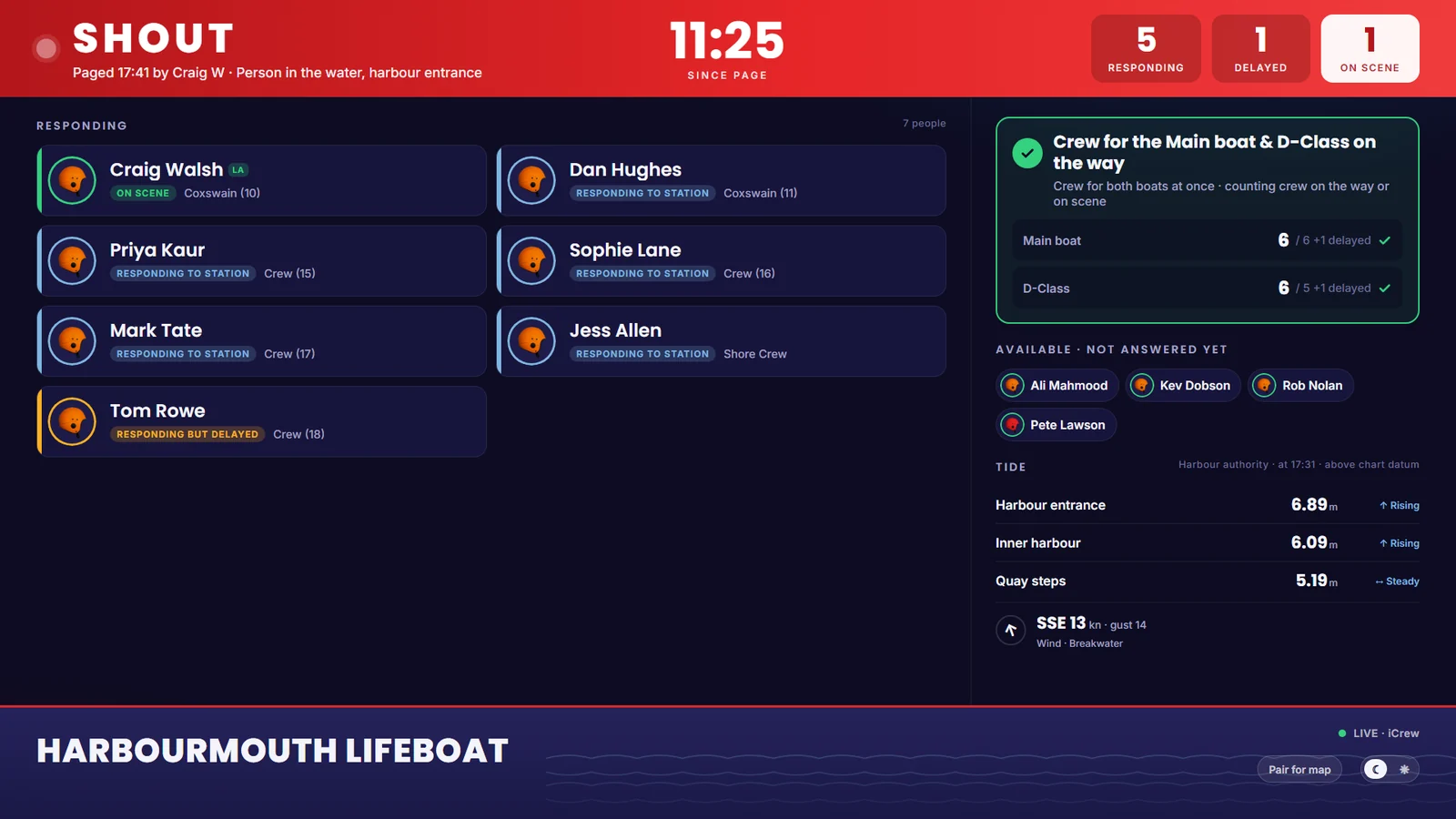
Open the crew board on any TV or screen with a web browser. It shows who is on call, whether you have the crew to go, and, the moment a page goes out, who is coming in. It keeps itself up to date, with nothing to press.

The crew board on standby: crew grouped by role with who is available, a Ready to launch verdict for both boats, on-call numbers for each role, the last callout and live tide heights
On standby. Who is on call for each role, whether each boat or appliance has the crew to go, changes coming up and the last callout.
The crew board during a callout: the time since the page, who is responding, delayed or on scene, whether the crew needed for each boat is on the way, and who hasn't answered yet
During a callout. Who is responding, delayed or on scene, a clock from the page, and whether the crew you need is on the way.
  • Ready to go, at a glance

    The board reads your crewing rules and says whether each appliance or boat has the crew to go out, and whether they can all go at once.

  • Switches for a callout

    As soon as a page goes out or someone responds, the screen turns to the callout, with a clock running from the page.

  • Your station's words

    Shout or Callout, Coxswain or Helm, your own names for roles, and each member's crew number.

  • The map stays private

    Responders appear on a map only on screens an admin has paired from the dashboard. The board link on its own never shows where anyone is.

  • Tides and wind

    Live tide heights and wind for stations near a supported harbour gauge.

  • Any screen, light or dark

    Fits any screen shape. Crew can choose to show their profile photo on it. Admins find the link in Station settings.

The crew-status screen in the iFire app: crew levels, who is responding to the station and each member's status
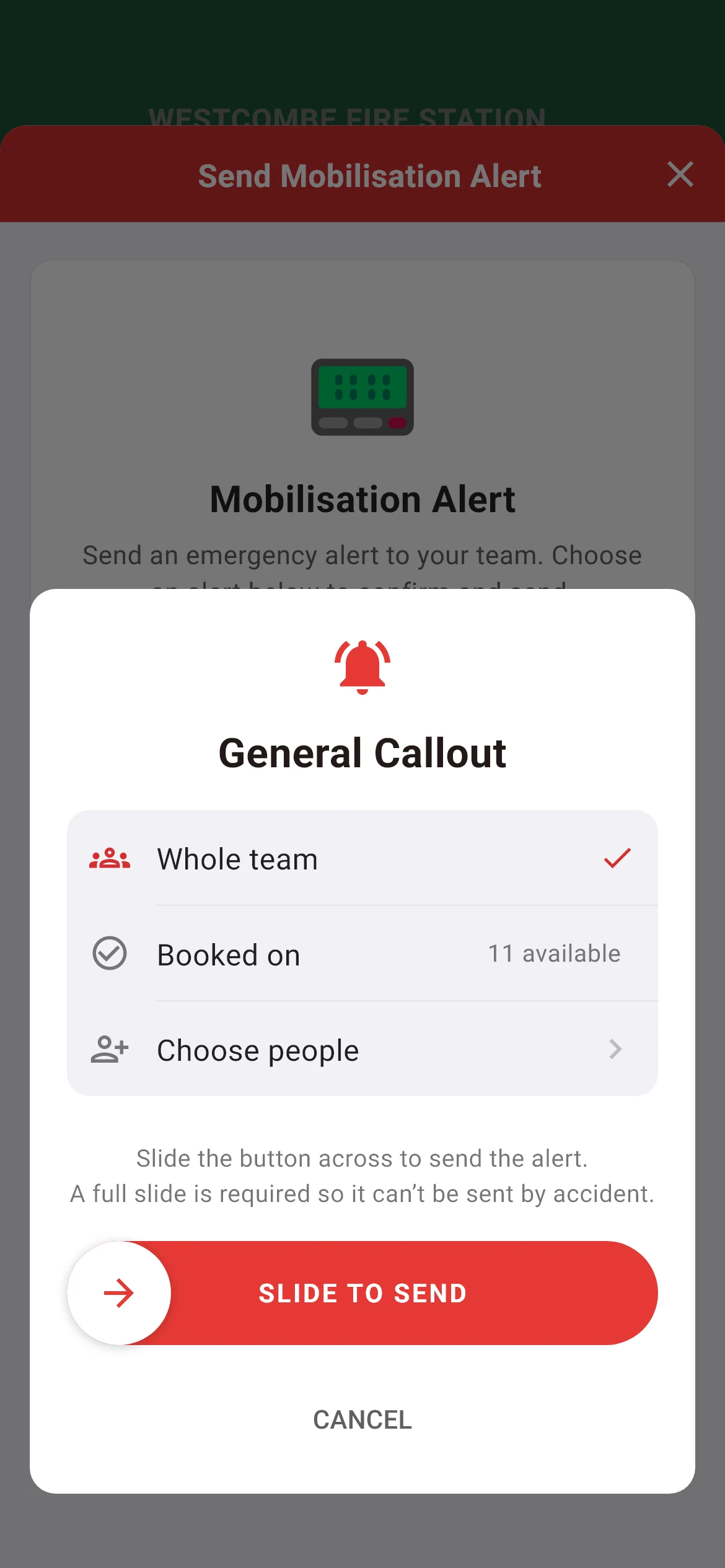
Sending a mobilisation alert from the iFire app: to the whole team, to crew who are booked on, or to chosen people, with a full slide to send

The crew app

In every responder's pocket.

The app each crew member uses to keep their availability current, receive mobilisation alerts and respond.

  • Alerts that cut through

    Mobilisation alerts ride past silent mode and Do Not Disturb at full volume, the way a pager would.

  • Availability in a tap

    Book on and off in a tap, or let a schedule do it for you.

  • Live responding status

    See who's responding before the appliance leaves the bay, as the response forms on every phone.

  • Resources to hand

    In iFire and iRescue, hydrants and defibrillators mapped around you, with no paper plans on the way to a job.

  • Contracted hours, tracked

    Set your weekly hours and get a nudge as you reach 50, 75 and 100 per cent. Only you can see them.

  • Alerts sent in seconds

    To the whole team, to crew who are booked on, or to people you choose. A full slide sends it, so it can't go by accident.

iOSAndroidiFireiCrewiRescue

Three editions

One platform, tuned for your service.

iFire, iCrew and iRescue share the same platform and the same Station Dashboard. Each app is tuned for how that kind of crew works.

iFire

Fire & rescue services · free to download

For retained, on-call and volunteer firefighters. Availability, mobilisation alerts that override silent mode, the resource finder and live responding status.

Download iFire on the App Store Get iFire on Google Play

iCrew

Lifeboat crews · free to download

For RNLI and independent lifeboat crews. Crewing rules for coxswains, boat crew, shore crew and tractor drivers, lifeboats in place of vehicles and a pager-style alert tone, without the land-based hydrant map.

Download iCrew on the App Store Get iCrew on Google Play

iRescue

Coastguard & rescue teams · free to download

For HM Coastguard and other voluntary rescue teams. Availability and alerts that cut through, plus one-tap status updates to HM Coastguard Alerting & Tasking, sent by SMS from the officer's phone where a team has it switched on.

Download iRescue on the App Store Get iRescue on Google Play

Security & resilience

Built to be relied on, day and night.

When someone is deciding whether to turn out, the tool in their hand has to just work. So does everything behind it.

  • Callouts never locked

    Billing can never silence a pager. If a subscription lapses, alerts, responding and status keep working.

  • UK data residency

    Hosted on Amazon Web Services in London, with an encrypted database and automated backups.

  • Resilient by design

    A load-balanced fleet of servers. If one has a problem, the others carry on.

  • Your data, kept separate

    Each organisation's information is scoped to it, and never shared with anyone else's.

  • Tested on every change

    Every change ships with automated tests, and nothing is released unless the whole suite passes.

  • Working towards WCAG 2.2 AA

    We publish an accessibility statement listing known issues, and an independent audit is scheduled.

Read how iOnCall is built

Developer API · preview

Open to your own software.

Read your station’s crew and who is available right now from your own tools: a crew-room screen of your own design, rostering, or reporting.

  • Each key reads one station, and only that station.
  • Read-only: it can never change a status or send a callout.
  • Current status only. Never contact details, locations or history.
See the developer API
curl https://ioncall.app/api/v1/station \
  -H "Authorization: Bearer $IONCALL_KEY"

{
  "name": "Kilbrook Fire Station (Demo)",
  "crew": {
    "total": 14,
    "available": 6,
    "responding": 0
  }
}
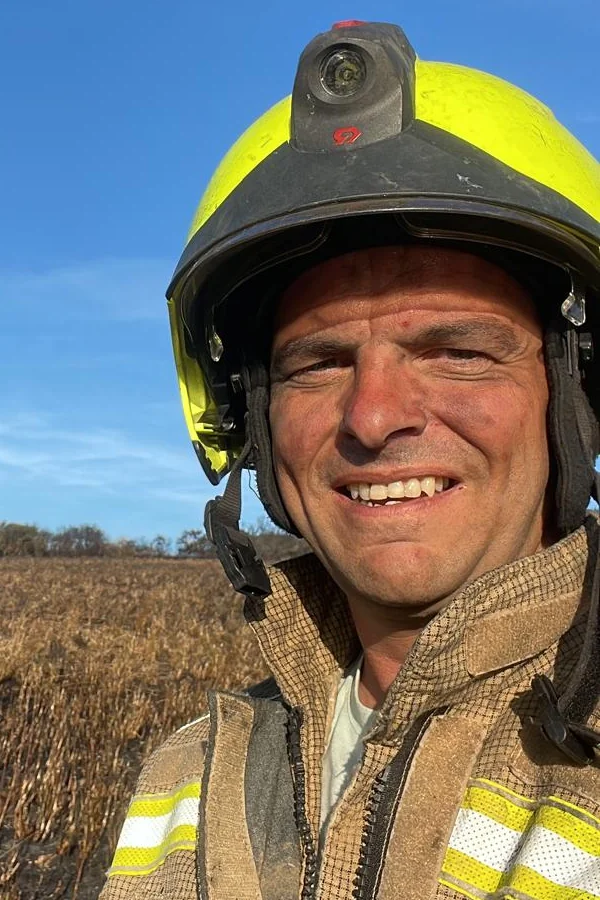
Graham Murt in fire kit and helmet, standing in a burnt-out field at a wildfire in Cornwall
Graham at a wildfire in Cornwall.

Built by responders

Designed from the back of a fire appliance.

iOnCall was started by a retained firefighter of twenty years who has also been a software developer for more than twenty-five. He built the first version to help his own station manage availability, then realised it could help crews everywhere, and he still uses it himself on every callout.

Graham MurtFounder · Retained firefighter and software developer

Pricing

One simple price per station.

Every feature for every crew member, in the app and on the Station Dashboard. You only pay for crew who actually use it.

Monthly

£1

per active crew member, per month

Minimum £10 a month

30-day free trial, no card needed

  • The app for every crew member, on iOS and Android, free to download
  • The Station Dashboard, with a login for everyone
  • Mobilisation alerts that break through silent mode
  • Availability planning, crewing rules and callout records
  • The crew board for your crew-room TV
  • UK hosting, updates and support
  • No VAT, no setup fees and no add-ons

Only active crew countCrew who used the app or changed their own status in the last 60 days, or joined in that time. Dormant members and leavers are free.

What a station pays8 active crew: £10 a month.
14 active crew: £14 a month or £140 a year.
30 active crew: £30 a month or £300 a year.

Callouts never lockIf a subscription lapses, alerts, responding and status keep working. Only the planning and compliance tools, crewing alerts and premium app features pause.

Opening soon

Opening to stations soon.

We're finishing testing the Station Dashboard now. When it opens, every new station gets a 30-day free trial with no card needed. Register your interest and we'll tell you the moment it's ready.

Already using iFire, iCrew or iRescue? Existing stations have until 31 January 2027 to move to a station subscription. See the FAQ.