
Every station I've been on has had a whiteboard by the door with names on it. Some have a TV in the crew room showing something. Neither tells you the thing you actually want to know when you walk in: who's on call right now, and can we get the appliance out?
So we've built a page for exactly that screen. The Crew board is a live view of your station, designed to be read from across the room. It works for iFire, iCrew and iRescue, and it comes with the Station Dashboard at no extra cost.
Day to day: who's on call
Most of the time the board shows your crew, grouped by role, and whether each person is on call. Next to each name is a line like "Until 7:00 am" or "Back at 6:00 pm", so you can see how cover changes through the day. A Coming up list shows who's about to come on or go off, and the last callout sits underneath.
Across the top, one line answers the big question: Ready to respond or Not ready to respond (on iCrew, Ready to launch). It's worked out from your station's own crewing rules, for each appliance or boat as well as the station as a whole. So it doesn't just say you're short; it says what you're short of. If you run two boats, it also tells you whether you've got the crew for both at once, or only one at a time.
Crew numbers show next to names if your station uses them. You choose which ranks appear, and what the board calls a callout.
When the pager goes: who's on the way
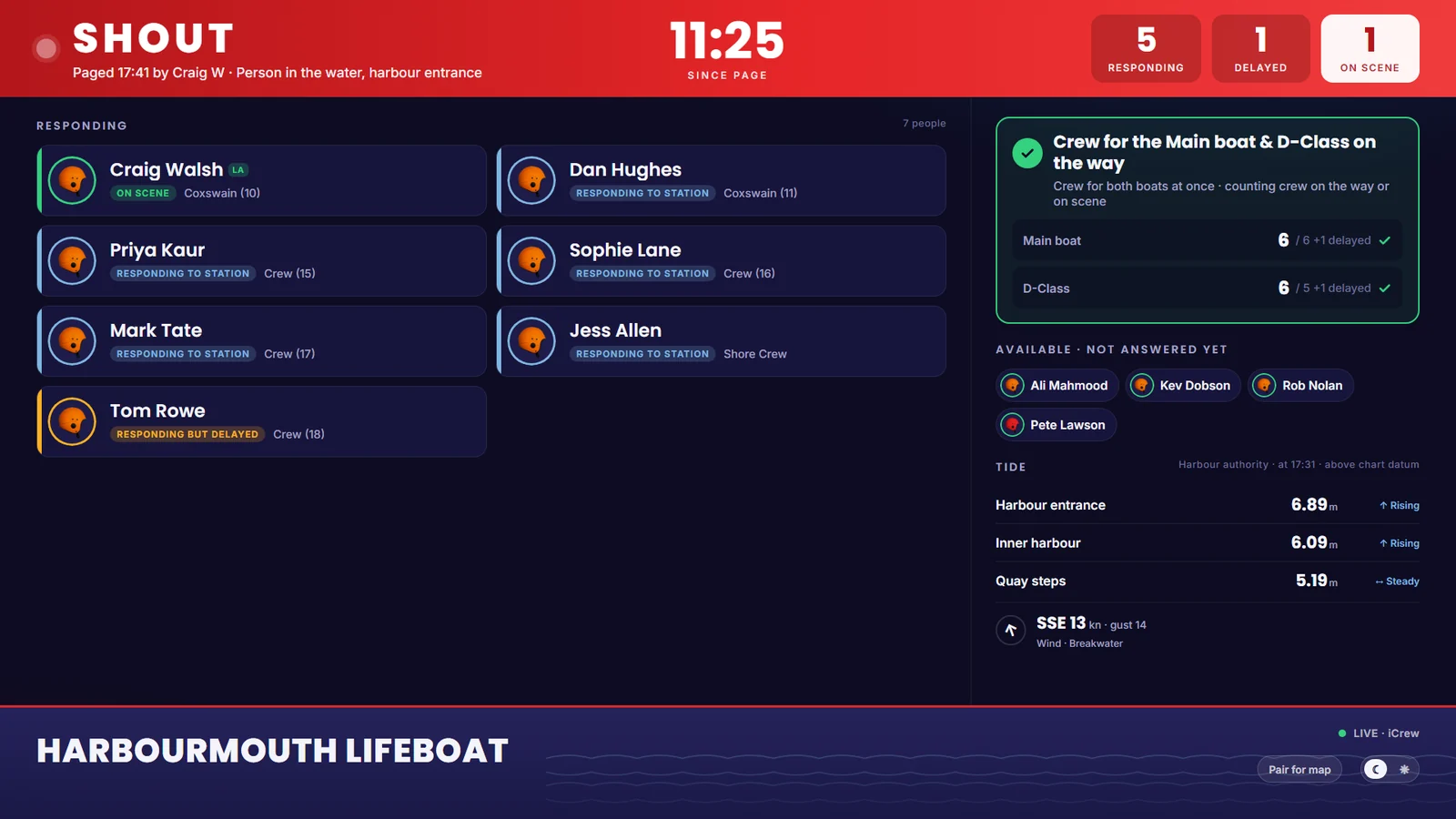
The moment a callout is paged, the board switches to the callout screen. You see who paged it and what it is, with a big clock counting up from the page. Below that, everyone who's answered: responding, responding but delayed, or on scene.
Alongside, the board checks the crew on their way against your minimums: officer in charge, drivers and so on. Anyone who was on call but hasn't answered yet is listed too, so the officer in charge knows who to chase.
Where the responders are, on screens you choose
The board can also show a live map of responders heading in. Their location is personal, so the map never appears on the board link by itself. A station admin has to pair each screen that's allowed to show it.
On the TV, choose Pair for map, and the board shows a short code. An admin types that code into the Station Dashboard, under Station settings > Crew board screens, and from then on that screen shows the map during a callout. An admin can unpair a screen at any time, and it goes back to showing the board without the map.
Tides and wind
Lifeboat crews asked for the tide on the board. Where there's a live feed for your stretch of water, the board can show current tide heights, whether the tide is rising or falling, and the wind. We set this up for each station by hand at the moment, so get in touch if you'd like it and we'll see what's available for your area.
Faces, if you want them
From the next app update, crew can add a profile photo. A photo only appears on the board if that person switches on Show on the crew board in the app. An admin can't do it for them. Until then, the board shows a plain helmet icon.
Putting it on the TV
Anything with a web browser will do: a smart TV, a streaming stick, a small PC or an old laptop plugged into the TV.
- On the Station Dashboard, go to Station settings > Crew board screens and copy the board link.
- Open it in the browser on the TV and make it full screen.
- Pick light or dark with the button in the corner. The screen remembers it.
That's it. The board keeps itself up to date as crew change their status, and it refreshes itself when we improve it, so you shouldn't need to touch it again.
One thing to bear in mind: the link shows names and availability to whoever has it, so treat it like the code on the station door. Put it on the crew-room screen, not in a group chat or on social media. Nobody's location is ever shown through the link alone.
If your station already runs our older TV board, it carries on exactly as it is. The Crew board is a separate page, so you can try it side by side.
Built on the station floor
The Crew board started with a lifeboat crew who wanted to see at a glance whether they could launch. It's been shaped by them ever since. If something would make it more useful in your crew room, tell us.
The screenshot is from a made-up lifeboat station, Harbourmouth.