
When we first built crewing rules for the Station Dashboard, they were a single list for the whole station: four crew, including an officer in charge, a driver and two BA wearers. That works for a fire station with one pump. It doesn't work for a lifeboat station.
A lifeboat crew showed us why. They run two boats with different crews. They need a tractor driver and shore crew as well as people in the boat. Their coxswains can do every job below them, so ticking each of those jobs on every profile was a chore that went wrong the moment someone forgot a tick. And the question they actually ask isn't "are we short?" but "can we launch, and can we launch both?"
So we rebuilt crewing rules around how a station really works. Here's what changed, using our made-up station, Harbourmouth, as the example.
Rules for each boat
Harbourmouth has two boats: a larger all-weather boat launched by a big tractor, and a small inshore boat. Each now gets its own card on the Crewing rules page, with its own minimums:
- The all-weather boat: at least 1 helm, 3 boat crew, 1 driver for the large tractor and 3 shore crew.
- The inshore boat: at least 1 helm, 1 boat crew, 1 tractor driver and 2 shore crew.
There's still a card for the whole station if you want one. Any rule can apply all day, or only at certain times and on certain days. Fire stations get the same thing, with a card for each appliance.
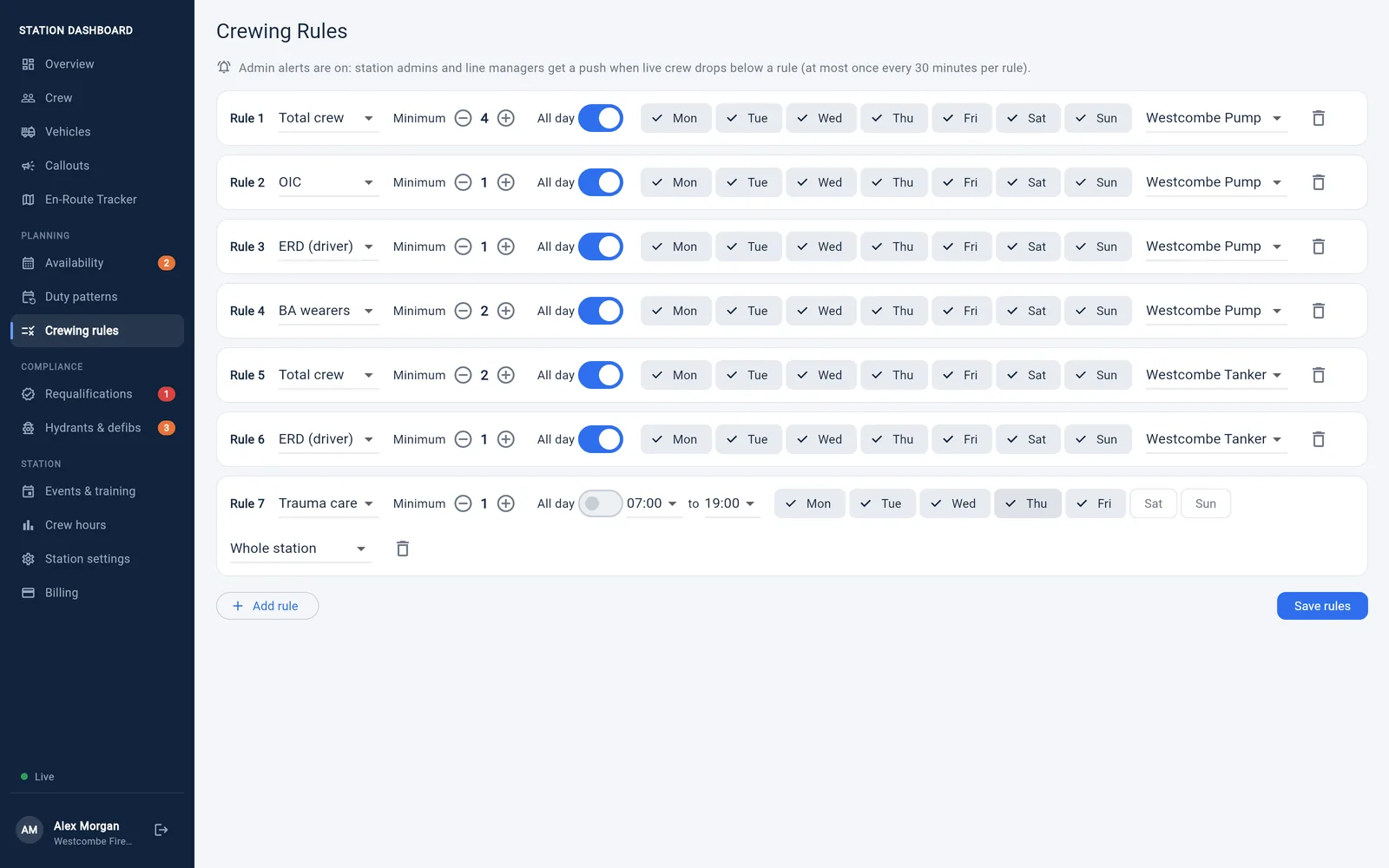
The Crewing rules page, shown here for our made-up fire station, Westcombe. On iCrew, the cards are your lifeboats.
Role ladders: tick the highest role only
A role ladder puts your roles in training order, highest at the top. Each role then counts as every role below it. Harbourmouth's crew ladder, from the top, is:
- Helm/Cox
- Navigator
- Boat crew
- Shore crew
So a navigator counts towards the navigator, boat crew and shore crew rules, without those being ticked. You only tick each person's highest role, and nobody falls off the count because a tick was missed.
Training that sits apart from the boat crew, like driving the launch tractor, goes on a ladder of its own. At Harbourmouth that's Tractor (large) above Tractor: anyone cleared for the big tractor can drive the small one too, but being a coxswain doesn't make you a tractor driver.
Ladders only change how people are counted: by the crewing rules, the planner, the Crew board and the low-crew alerts. Profiles still show exactly what's ticked.
The roles a launch needs
On iCrew, the roles you can set rules for now match a launch: Helm/Cox, Navigator, Boat crew, Shore crew, Tractor and Tractor (large). Boat crew, shore crew and the tractors each get their own count in the app and on the board as soon as anyone at your station holds them, next to Helm/Cox, so you can see straight away how many of each are on call.
Your names, not ours
Every station calls things something different. Under Names for roles you can rename any role to what your crew actually say. If everyone at Harbourmouth calls the big tractor "the New Holland" and the small one "the Zetor", that's what the profiles, the crewing rules, the Crew board and the app will say.
Can we launch both?
This was the question the crew cared about most. With two boats, it isn't enough for each boat to be crewable on its own: the same people can't be in both. The Crew board now works out whether the people on call can crew both boats at once, sharing them out so that nobody is counted twice. If they can't, it says so: "Ready to launch: one boat at a time".
When only one boat can go, the board names it. When neither can, it tells you what you're short of.
"Lifeboats", not "vehicles"
A small thing, but it matters: on iCrew the Station Dashboard now talks about Lifeboats, not vehicles, and shows a boat, not a fire engine. The Crew board says Ready to launch, and calls a callout a Shout.
Setting it up
A station admin sets all of this up on the Crewing rules page of the Station Dashboard. Once rules are saved, station admins and line managers get a push if live crew drops below one, at most once every half hour per rule. Crewing rules are part of the station subscription, and every station can try them free for 30 days.
Thank you to the lifeboat crew who walked us through their launch, role by role. If your station does things differently, tell us how: that's how this got built.