
The app can change your status for you at the right time, or remind you to. These settings are in Settings › Status Changes.
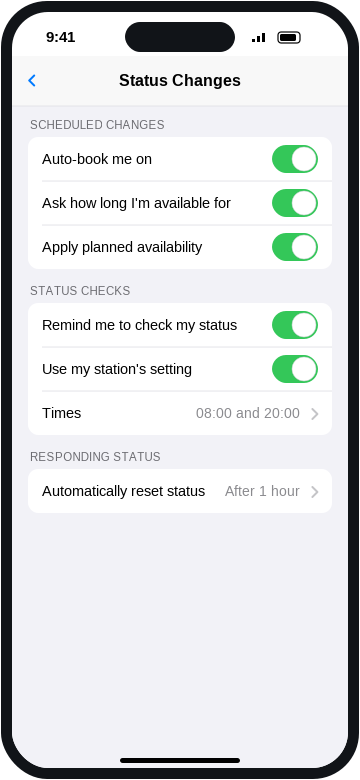
Scheduled changes
- Auto-book me on: when your book-on time comes, you're made available. Switch it off to get a reminder instead.
- Ask how long I'm available for: when you go available, the app asks when to book you off. Your station may have this on for everyone; you can switch it off for yourself.
- Auto-change my status when I'm due to be booked off: when that time comes, you're made unavailable. Switch it off to get a reminder instead.
- Apply planned availability: when a planned slot starts, your status changes to match it.
Status check reminders
At set times, normally 08:00 and 20:00, you get a notification saying what you're set to, for example You're currently available. Still right? Tap it to change your status if it's wrong.
- You won't get one for an hour your planned availability already covers.
- Your station admin can switch reminders on for everyone and choose the times. Switch off Use my station's setting to pick your own times, up to six a day, or turn them off.
Clearing responding statuses
Automatically reset status clears a responding status after a set time, from 5 minutes to an hour. Choose Disabled to keep it until you clear it yourself.
If your station clears responding statuses when a callout is stood down, the screen says so, and When stood down takes the place of Disabled. Pick a time if you'd like yours cleared sooner than that.