
 iCrew
iCrew for lifeboat crews
Know you can launch before the pagers go.
iCrew is the iOnCall edition for RNLI and independent lifeboat crews. Crewing rules for each boat know your coxswains, boat crew, shore crew and tractor drivers, and the crew-room board shows at a glance whether you have the crew to launch.

What iCrew does
Made for boats, not fire engines.
Crewing rules for each boat
A card for each boat, with the coxswains, boat crew, shore crew and tractor drivers it needs to launch, all day or at set times.
Role ladders
A coxswain also counts as boat crew, so you tick only each person's highest role.
Every boat at once
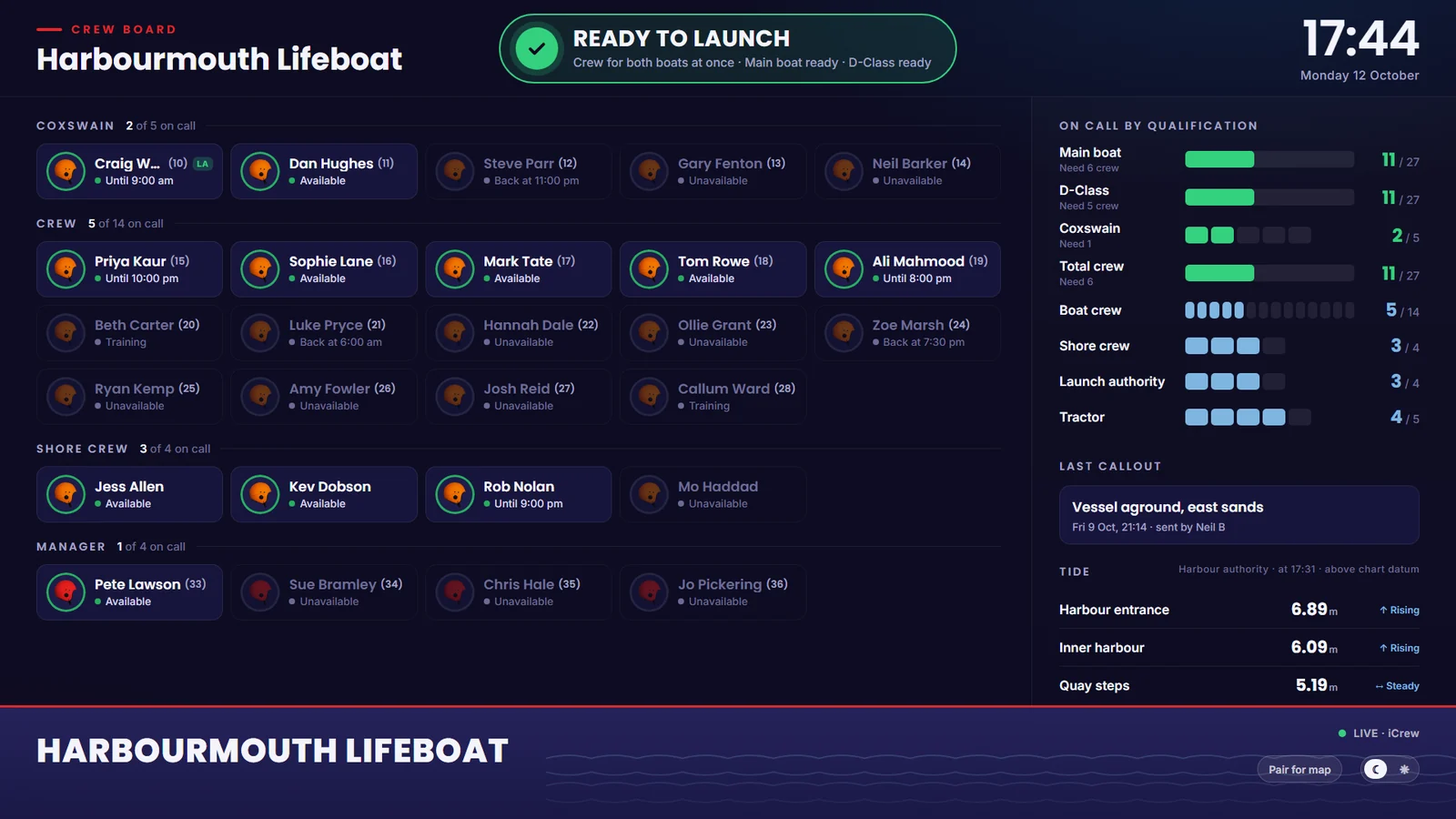
The crew board reads your crewing rules and says whether each boat has the crew to go, and whether they can all go at once.
A pager-style alert
Callout alerts ride past silent mode and Do Not Disturb at full volume, with a pager-style alert tone.
Your station's words
Shout or Callout, Coxswain or Helm, your own names for roles, and each member's crew number, on profiles, rules and the crew board.
Tides and wind
Live tide heights and wind on the crew board for stations near a supported harbour gauge.
Crew board
Your station, live on the crew-room TV.
Open the crew board on any TV or screen with a web browser. On standby it shows who is on call for each role and whether each boat can launch. The moment a page goes out it switches to the callout: who is responding, delayed or on scene, with a clock from the page.
How it works
Plan, alert, respond, review.
- 01
Plan
Admins set crewing rules and duty patterns. Crew keep their availability up to date from the app.
- 02
Alert
When a callout goes out, mobilisation alerts sound on every crew member's phone, even on silent.
- 03
Respond
Crew tap to respond. The dashboard shows who is coming in, and how far away they are.
- 04
Review
Every callout, who answered it and when it was stood down stays on record for the station.
Questions
iCrew questions.
Do we need special equipment for the crew board?
No. It runs on any TV or screen with a web browser and keeps itself up to date, with nothing to press. An admin finds the link in Station settings on the Station Dashboard.
Does the crew board show where crew are?
Only on screens an admin has paired from the dashboard. The board link on its own never shows where anyone is.
Is iCrew different from iFire?
They share the same platform and the same Station Dashboard. iCrew is tuned for lifeboats: boats in place of vehicles, lifeboat crewing roles and a pager-style alert tone, without the land-based hydrant map.
How much does it cost?
One subscription per station: £1 per active crew member a month (minimum £10) or £10 a year (minimum £100), plus VAT. The app is free to download, and every new station gets a 30-day free trial with no card needed.
Where is our data kept?
On Amazon Web Services in London, with an encrypted database and automated backups. If a subscription ever lapses, callouts, responding and status updates keep working for everyone.
One platform
Three editions, one Station Dashboard.
The other editions

Now open
Start your 30-day free trial.
Set up your station on the Station Dashboard, on a computer or tablet. Every feature for the whole crew, no card needed, and nothing is charged when the trial ends.
Kernow Software Ltd, trading as iOnCall. Prices exclude VAT. Terms of service.