
Every member can choose a line manager: a person at the station who looks after them. It is always the member's own choice. Nobody can be made someone's line manager without them choosing it, and you can't choose yourself.
What a line manager can do
- Edit the profiles of the crew who chose them: name, rank, crew number, callsign, qualifications and launch authority (DLA). Station admins can do this for every member too.
- Change the availability of those crew, on the dashboard and in the app.
- Apply duty patterns to those crew.
- See their hours and their availability history on the Crew hours page and in the change history.
Station admins can also change anyone's availability. Making someone admin, removing a member and station settings stay with admins.
Who sees your history
Everyone at the station can see current and planned availability, because covering the station is the point. Your history (what you were set to in the past and your hours) is yours. Only you and the line manager you chose can see it. Station admins can't see it just because they're admins.
Choose your line manager
- On the dashboard, choose your name at the bottom of the sidebar to open My profile. Or go to Crew and look under your own row.
- Pick a name in My line manager. Choose None to clear it.
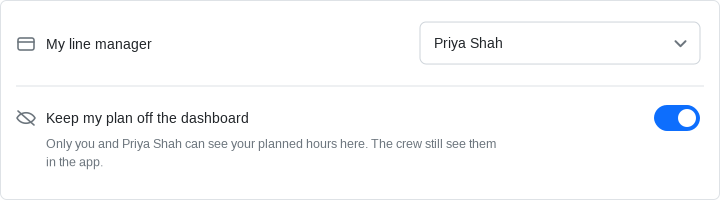
You can also choose your line manager in the app. Clearing it takes their access away straight away.
Keep your plan off the dashboard
Switch on Keep my plan off the dashboard if you don't want your planned hours on the dashboard's planning grid. Only you and your line manager will see them there. Your crewmates still see your plan in the app, and crewing counts still include you.
Asking crew to choose you (line managers)
On Crew hours, choose Ask crew. Each person you pick gets a notification asking them to choose a line manager in the app. It's their choice, and each person is asked at most once a week.