
A callout alert that doesn't make a sound is no use. Take five minutes when you install the app, and again after a phone update, to check that alerts reach you loudly.
Send yourself a test alert
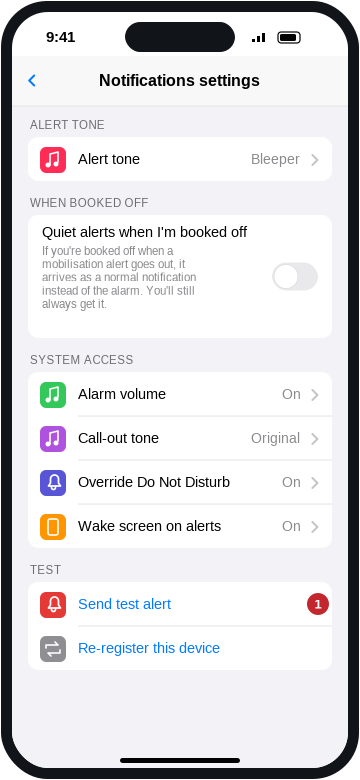
- Open the side menu and go to Settings › Notifications settings.
- Tap Send test alert, then lock your phone straight away.
- Within a few seconds, your phone should sound the full callout alarm.
The test comes with the callout buttons too, so you can check I'm responding works. Pressing it on a test never changes your status.
If the test doesn't arrive
- Tap Re-register this device. It gets your phone a fresh push address and sends it to the server. Then send another test.
- Check notifications are allowed for the app in your phone's settings.
- Check the app isn't restricted by battery saving (Android).
Android: make alerts loud
The System access settings give the app what it needs to sound through Do Not Disturb and wake the screen. Make sure each one is set as below:
- Alarm volume: should say On. Alerts play at your alarm volume, so they still sound when your ringer is silenced. If it says Muted, turn your alarm volume up.
- Call-out tone: should say Original. If it says Changed, the phone plays a different sound for callouts than the app's own tone. Tap it to see how to put it back.
- Override Do Not Disturb: should say On.
- Wake screen on alerts: should say On.
iPhone: Critical Alerts
On iPhone, tap Open iOS notification settings and make sure notifications, sounds and Critical Alerts are on. Critical Alerts sound even when your phone is on silent or in a Focus.
Watch for the warning
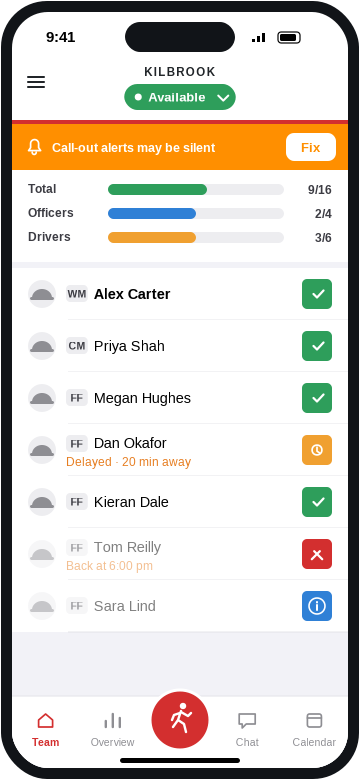
If the app spots a setting that could silence alerts, an amber bar appears at the top of the Team screen: Call-out alerts may be silent on this phone. Tap Fix to go straight to the setting.
Quiet alerts when you're booked off
Switch on Quiet alerts when I'm booked off if you don't want the alarm when you're not on call. Alerts still reach you, as an ordinary notification ending You're booked off, so this came through quietly., so you always know a callout went out. It still has the I'm responding button. If your station re-alerts crew who haven't answered, booked-off crew are never re-alerted.