
If your team is also paged by text message, your iPhone can sound the app's callout alarm when the pager text arrives. It uses an automation in Apple's Shortcuts app. It only sounds the alarm on your phone; it never pages your station. You need iOS 17 or later.
Set it up
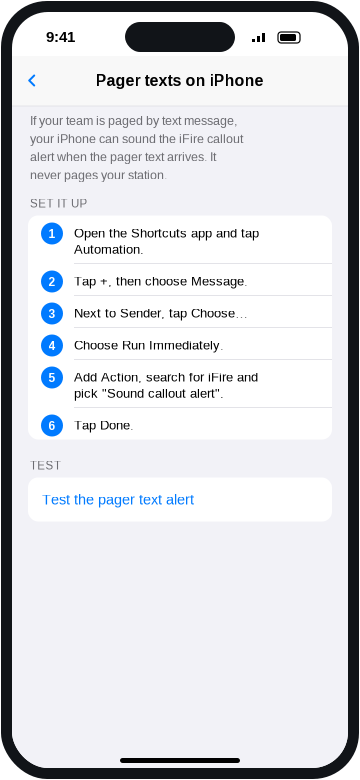
- Open the Shortcuts app and tap Automation at the bottom.
- Tap + (or New Automation), then choose Message.
- Next to Sender, tap Choose and pick the number your pager texts come from.
- Choose Run Immediately, so it doesn't wait for you to tap it.
- Tap New Blank Automation, then Add Action. Search for your app (iFire, iCrew or iRescue) and pick Sound callout alert.
- Tap Done.
You'll find these steps, and a button to test it, in the app at Settings › Notifications settings › Pager texts on iPhone.
Make it loud
Allow Critical Alerts for the app, so the alarm sounds even when your phone is on silent.
Keep your pager with you too. A text can be delayed by your mobile network, and an automation can be switched off by an iOS update.