
The Availability page shows your station's planned cover for the coming days, and lets admins and line managers change crew members' plans. It's the dashboard's main planning tool.
Reading the planner
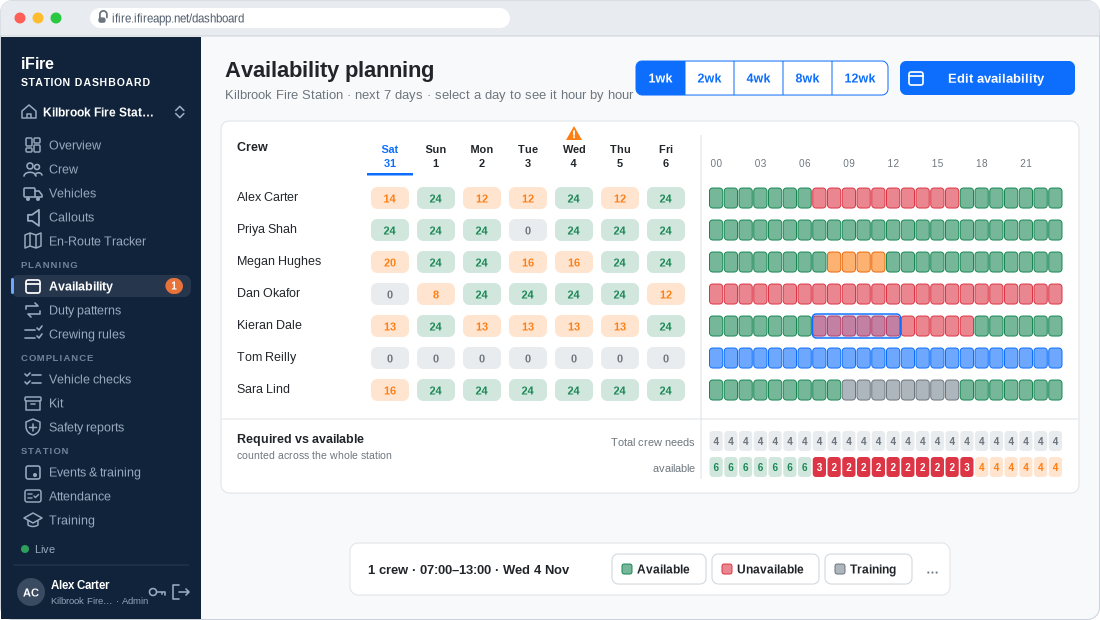
- Left: one column per day, with each person's available hours. Green means all day, peach part of the day, grey none.
- Right: the day you've selected, hour by hour, in the status colours: green available, orange delayed, grey training, blue leave and red unavailable.
- Required vs available: for each crewing rule, how many people you need and how many you have, hour by hour. Red cells are below your minimum, orange cells are right on it.
- An orange triangle above a day means it's short of crew somewhere. Hover over it to see when.
Use 1wk, 2wk, 4wk, 8wk or 12wk to look further ahead. Members who keep their plan off the dashboard show as (private), unless they chose you as their line manager.
Change availability by dragging
- Click a day at the top to show it hour by hour.
- Drag across the hours you want to change. Hold Shift to add more people, or Ctrl (Cmd on a Mac) to pick them one at a time.
- Choose a status in the bar at the bottom, or Whole day to set the whole day. Cancel clears the selection.
Change lots at once
Choose Edit availability to change many people or many days in one go.
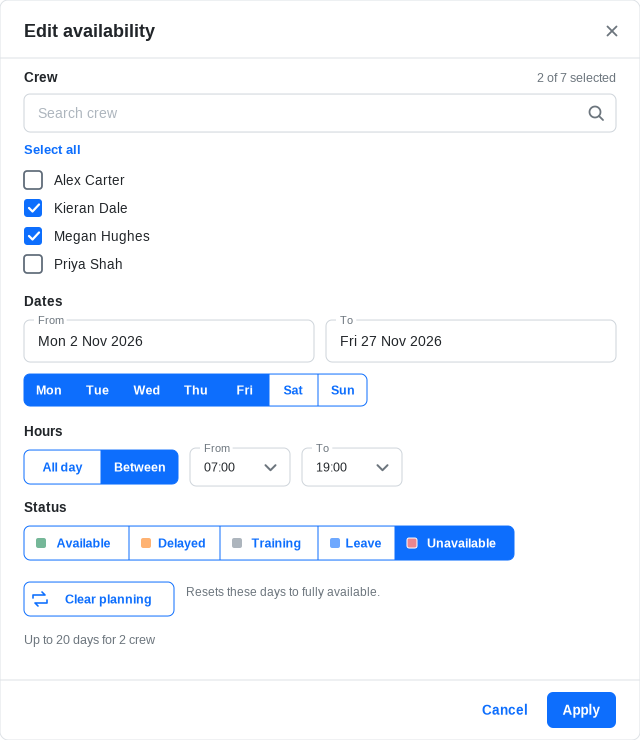
- Tick the crew to change.
- Choose the From and To dates and the days of the week.
- Choose All day or the hours Between two times.
- Pick a status and choose Apply. For a big change, the dashboard asks you to confirm first.
Clear planning resets the days to fully available.
Who can change what
- Station admins can change anyone's plan.
- Line managers can change the plans of crew who chose them.
- Crew aren't notified when their plan is changed here.
- You can change plans from 7 days ago onwards, and up to 2,000 days in one go.
Change history
Click a person's name to see every change to their plan: when, by whom, and whether it came from the app, the dashboard or a duty pattern. Change history is only visible to the member and the line manager they chose, not to admins.
The Availability page needs a station subscription. See Station subscription and free trial.