
If something nearly went wrong, someone was hurt or kit was damaged, report it from the app so your station can put it right. You can report without giving your name.
Send a report
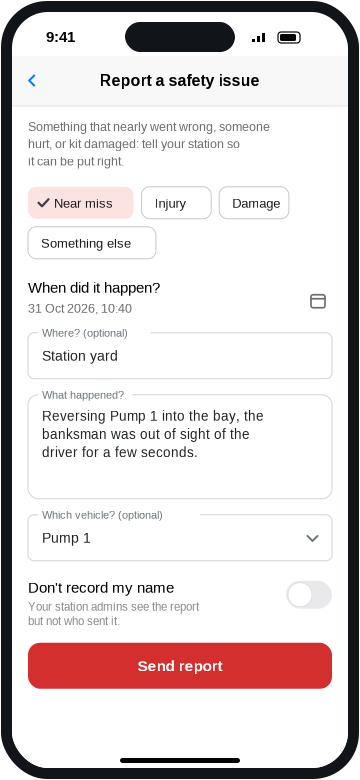
- Open the side menu and tap Report a safety issue.
- Choose the kind: Near miss, Injury, Damage or Something else.
- Tap When did it happen? to change the date and time. It starts at now, and can go back up to a year.
- Add Where? if it helps.
- Describe What happened? in at least 10 characters.
- If a vehicle was involved, pick it under Which vehicle?.
- Tap Send report.
The app says Thanks. Your station admins have been told.
Reporting without your name
Switch on Don't record my name before you send. Your name isn't kept with the report at all, so your station admins see what happened but not who sent it.
What happens next
Your station admins are told about the report. Admins and training officers can see every report on the Station Dashboard, write down the action taken and mark it reviewed.
This isn't a way to get help in an emergency. If someone needs help now, call 999.