
Two settings on the Crewing rules page make the counts match how your station really works.
Role ladders
A role ladder puts roles in training order, highest at the top. Each role counts as every role below it. So if a Coxswain can also crew as Navigator or Boat crew, you only need to tick Coxswain on their profile.
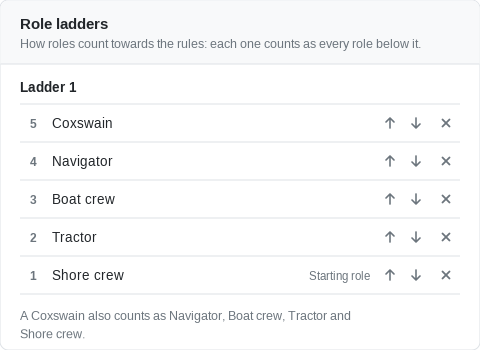
- On Crewing rules, under Role ladders, choose Start a ladder.
- Use Add role to add roles. Each new role goes on top; use the arrows to reorder.
- Choose Save ladders.
Keep separate training, such as tractor driving, on a ladder of its own. You can have up to 4 ladders of 12 roles, and each role can only be on one ladder. Crewing rules, the crew board and low crew alerts all count this way. Profiles still show only what's ticked.
Names for roles
Call a role what your station calls it, for example Zetor for Tractor or Coxswain for Helm/Cox. Under Names for roles, type your name next to the standard one and choose Save names. Your names show on profiles, crewing rules, the crew board and the app.
Only station admins can change ladders and names.