
When a job is cancelled or doesn't need everyone, standing down tells the crew so nobody else turns out. On the dashboard you can also record a stand down after the event, correct its time, and look back at who responded and when.
Stand down a callout
Station admins and launch authorities can stand down.
- Go to Callouts and click the callout in Callout history.
- In the panel, choose Stand down now, then confirm.
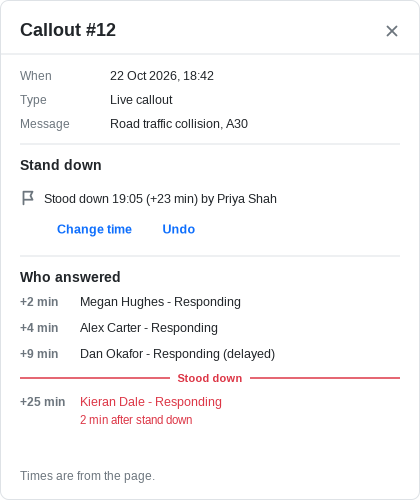
Everyone at the station gets a Stood down notification, the crew board goes back to standby, and a green message appears in the station chat.
Record a stand down after the event
Choose Stood down earlier... and enter the time. A time more than 15 minutes ago is recorded without notifying anyone. Use Change time or Undo to correct it.
Keep going on a long job
For a live callout paged in the last 24 hours, Keep going keeps the crew board's callout screen and timer up for another 6 hours.
Who answered
Admins see a timeline of who answered and how many minutes after the page. A red Stood down line marks the stand down, and anyone who responded after it is shown in red.
The responding log
The Responding log card (admins only) lists every change to a member's responding status over the last 7 days, 30 days or 90 days, newest first:
- How says where it came from: In the app, Callout button, Auto-reset and so on.
- Callout · after page links it to a callout, for example #12 · +4 min. (likely) means the member tapped in the app, so it's matched to the latest callout in the 3 hours before.
- Answers that came after a stand down are marked in red, for example +2 min after stand down.
Tick Show automatic clears (auto-reset, went unavailable) to include statuses that cleared by themselves.