
Your station's admins can pin short notices for the crew: a changed drill night, a closed gate, a reminder about kit. They show at the top of the Team screen in the app, and on the crew board if your station has one.
Reading notices
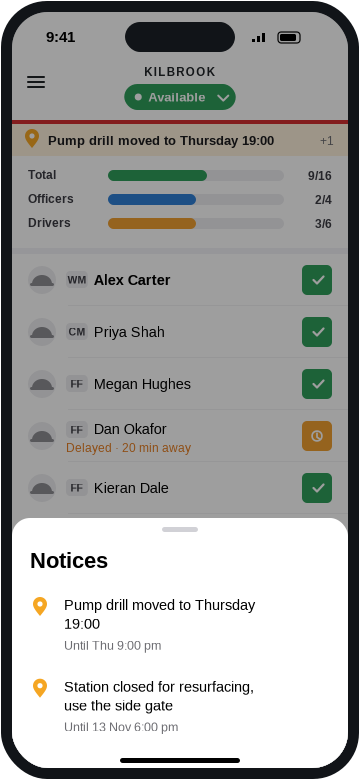
When there's a notice, a one-line amber strip with a pin appears at the top of the Team screen. It shows the notice that ends soonest. +1, +2 and so on means there are more.
Tap the strip to open Notices and read them all in full, with when each one ends.
When notices go
Every notice has an end time and disappears by itself when it passes. When nothing is pinned, the strip isn't there at all. Notices don't send a notification.
Adding a notice
Notices are pinned by station admins on the Station Dashboard, not in the app. If something needs to go up, ask your station admin.