
Your profile tells your crew who you are and what you're qualified for. To see it, open the side menu and tap Your profile, then Edit.
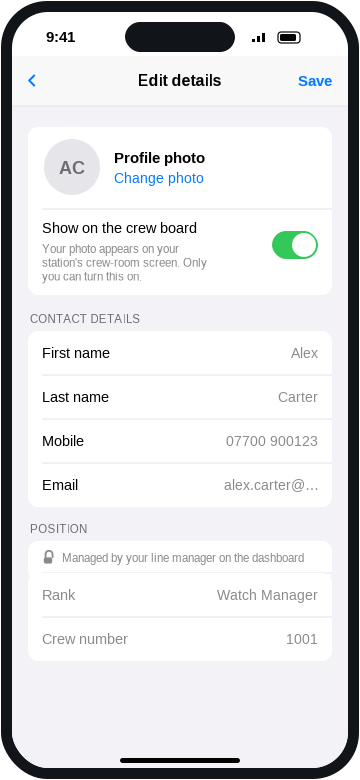
What you can change
- Your first name, last name, the name you're known by, and your mobile number.
- Your profile photo.
- Share data: whether admins can see your availability figures. Only you can change this.
Tap Save when you're done. Your email address is how you sign in, so it can't be changed in the app. Your rank, crew number, callsign and qualifications may be kept on the Station Dashboard; if so, you'll see Managed by your line manager on the dashboard and those rows can't be changed in the app.
Who else can edit your profile
You, your station's admins, and the line manager you chose. Admins can keep everyone's details, rank and qualifications up to date, but they can't see your hours or your availability history. Only you and your line manager can.
To choose your line manager, open Your profile and tap Line Manager. Your line manager can then edit your details and photo, keep your rank and qualifications up to date on the dashboard, change your planned hours and see your hours. Choose None to take that away at any time.
Add a profile photo
- Tap Add photo, then Take photo or Choose from library.
- Move and pinch the photo to fit your face in the circle, then tap Use photo.
Photos save straight away. Tap Remove photo to take it off.
Show your photo on the crew board
Your station may have a crew board on a TV in the crew room. Your photo only appears there if you switch on Show on the crew board. Nobody else can turn this on for you, not even your line manager.
Looking at someone else's profile
Tap anyone on the Team screen to see their profile, qualifications and status. With a mobile number on file you can call or text them from there. Their hours and history are private to them and their line manager.
If you're a station admin, or someone's line manager, you'll also see Edit at the top of their profile. It opens the same screen they use, with their photo; only they can choose to show it on the crew board.