
Some people need to see who's available without being part of the crew: trustees, managers or a visiting officer. Station admins can make them an observer.
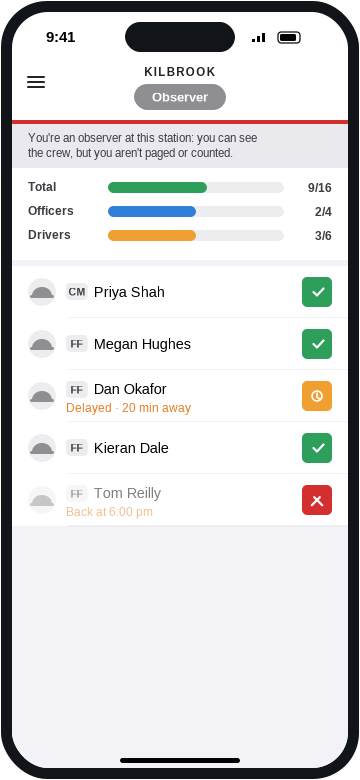
What an observer sees
- The Team screen: the crew list, everyone's status and the crewing bars.
- A grey Observer label where your own status would be, and the line You're an observer at this station: you can see the crew, but you aren't paged or counted.
What an observer can't do
- Set a status, go responding or plan availability. There's no status picker and no tab bar, so no Overview, Chat or Calendar tabs.
- Get callout alerts. Observers are never paged.
- Appear in anyone else's crew list, or count towards crewing or the station's bill.
- Use My training or Report a safety issue, which are for crew.
- Change anything. If an observer tries, the app says Observers can see the crew list but can't change anything.
Becoming crew again
Only a station admin can switch someone between crew and observer, on the Station Dashboard. An admin can't be made an observer without first being made crew-only. See Managing your crew list.