
A duty pattern is a reusable availability template, such as days 07:00 to 19:00 Monday to Friday, or 4 on 4 off. Apply it to crew and their plans are filled in for weeks ahead.
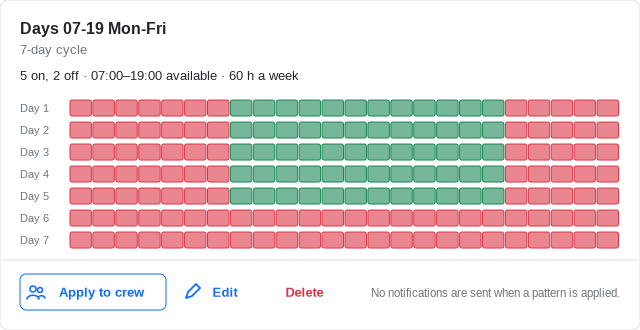
Create a pattern (admins)
- Go to Duty patterns and choose New pattern.
- Give it a name and set the Cycle length: 7 days for a weekly pattern, or anything from 1 to 56 days.
- Start from a preset if one is close: Days 07-19 Mon-Fri, Nights 19-07, 4 on 4 off (days) or Weekends.
- Pick a status, then click or drag across the grid to paint the hours.
- Choose Save pattern.
Apply a pattern
Admins can apply a pattern to anyone; line managers to crew who chose them.
- Choose Apply to crew on the pattern.
- Tick the crew.
- Choose the start date. Day 1 of the pattern falls on that date.
- Choose how long for: 1, 2, 4, 8 or 12 weeks.
- Choose Fill gaps to leave days crew have already planned alone, or Overwrite to replace everything in the range.
- Choose Preview to see how many days will be written, then Apply.
Crew aren't notified when a pattern is applied. Deleting a pattern doesn't change plans it was already applied to.
Crew can also set their own repeating rota in the app, up to 52 weeks ahead. See Booking time off and setting your rota.