
You don't have to be an admin to bring someone onto your station. Anyone on the station can make an invite code in the app and share it.
Make an invite code
- Open the side menu and tap Stations.
- Tap your station, then Invite Crew.
If you belong to more than one station, the app switches to the station you tapped first, so the code is always for the right one.
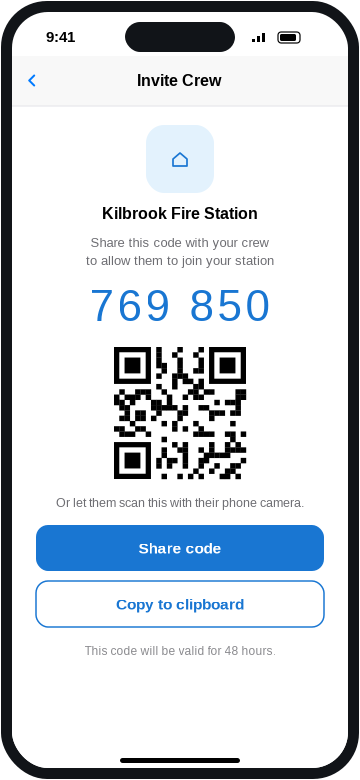
Share it
- Share code opens your phone's share sheet, so you can send it by text, WhatsApp or email. The message has the code and an invite link.
- Copy to clipboard copies the code to paste anywhere.
- If the new member is with you, let them scan the QR code. With the app installed they tap Scan invite QR. Without it, their phone camera opens the invite web page, which has links to the App Store and Google Play.
Each code runs out after a while, so make a fresh one for each new person rather than reusing an old message.
Check it's the right app
Codes only work in your station's app. An iCrew code won't work in iFire, and the app says so if someone tries. Make sure new members install the same app you use.
Inviting by email instead
Station admins can also invite crew by email from the Station Dashboard. See Inviting crew by email.