
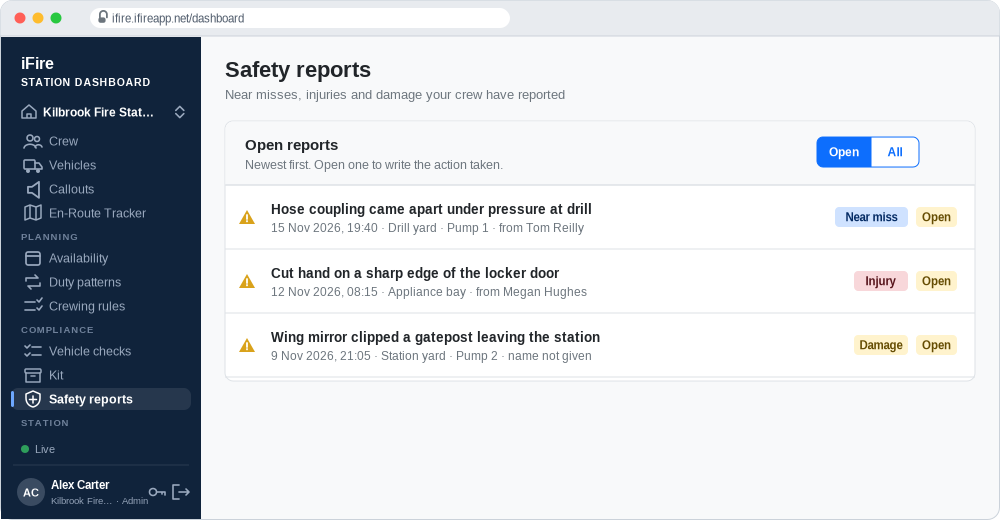
Crew can report near misses, injuries, damage and other safety issues from the app. The Safety reports page is where you read them, record what was done and mark them reviewed.
Station admins and training officers can review reports. Station admins get a notification and an email when a new report comes in.
How crew report
In the app, crew choose Report a safety issue in the side menu. They say what happened, when and where, and which vehicle if one was involved. They can choose not to give their name. See Reporting a near miss or safety issue.
Review a report
- Go to Safety reports. Open shows the reports nobody has reviewed yet.
- Click a report to read it.
- Under Action taken, write what was done, or what will be.
- Choose Save note to keep it open, or Mark reviewed to close it.
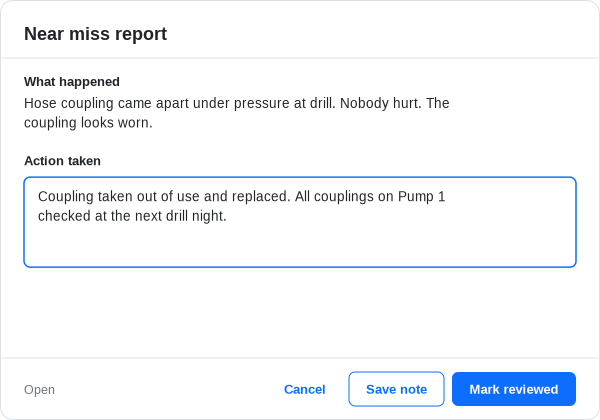
A reviewed report shows who reviewed it and when. If something comes back, open it and choose Reopen.
See every report
Choose All to see reviewed reports too. Each report shows its kind: Near miss, Injury, Damage or Other.