
Station admins can page crew from the dashboard's Callouts page: a live callout to mobilise the crew, or a test to check alerts reach everyone. Callouts always work, even if the station subscription has lapsed.
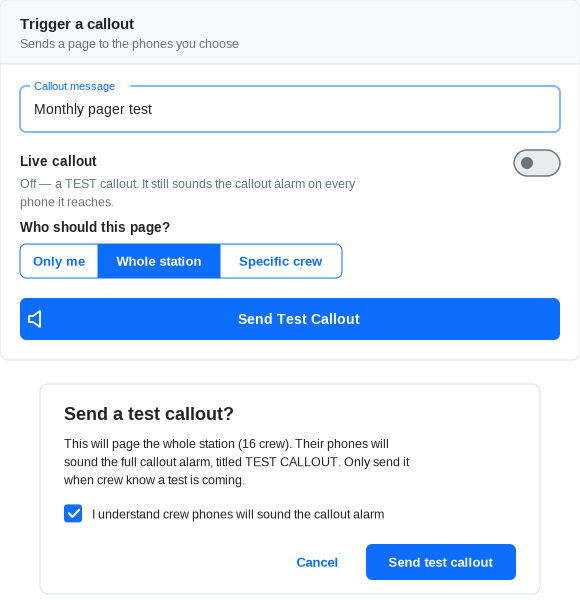
Send a callout
- Go to Callouts.
- Type a Callout message, for example Structure fire, High Street.
- Leave Live callout off for a test, or switch it on to page real crew.
- Choose who to page: Only me, Whole station or Specific crew.
- Choose Send Test Callout or Send Live Callout.
- Tick the box to say you understand, then choose Send test callout (or Page real crew for a live one).
A test still sounds the full callout alarm, titled TEST CALLOUT, on every phone it reaches. Only send one to other people when they know a test is coming. Sending to Only me is the safe way to check your own phone.
After sending
- The callout appears in Callout history and in the station chat, with your name.
- Click a callout in the history to see its details and, for admins, who answered and how quickly.
- If the dashboard can't confirm it was sent, check the history before sending again.
To stand the crew down, see Standing down and the responding log.