
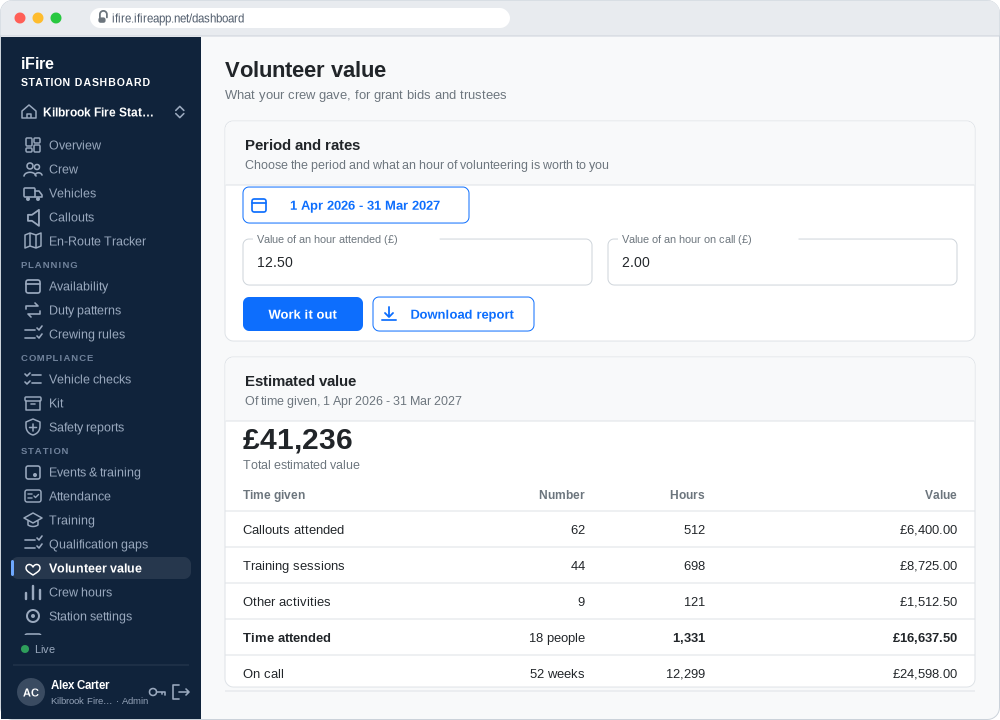
The Volunteer value report puts a figure on the time your crew gave over a period. It's made for grant bids, annual reports and trustees. Only station admins can see it.
Work it out
- Go to Volunteer value.
- Choose the period. It starts as the last 12 months and can be up to 366 days.
- Enter what an hour is worth to you in Value of an hour attended (£) and Value of an hour on call (£). Leave one blank if you don't want to value that time.
- Choose Work it out.
What it counts
- Callouts attended, Training sessions and Other activities come from confirmed records in the attendance register. Drafts don't count, so confirm your records first.
- On call is the crew's availability for whole weeks starting in the period, as one total for the station.
- The report never names anyone.
If fewer than 3 members were on call in any week of the period, on-call time is left out, because a total could point to one person.
Download the report
Choose Download report. It saves a one-page report you open in your browser, then print or save as a PDF to attach to a bid.