
Every station needs at least one admin to manage it. If yours has none, or its admins have stopped using iOnCall, the crew can sort it out between them in the app. Nobody needs to contact iOnCall.
When this happens
An amber bar appears on the Team screen:
- Your station has no admin: nobody has admin rights.
- Your station has no active admin: nobody with admin rights has used the app or dashboard in 60 days, or they've been voted out.
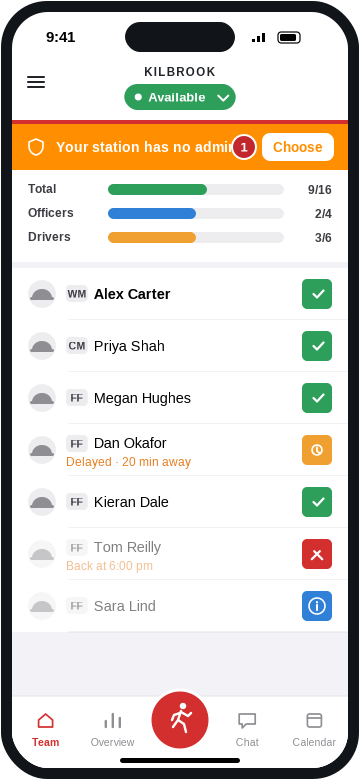
Tap Choose to open the Station admin screen.
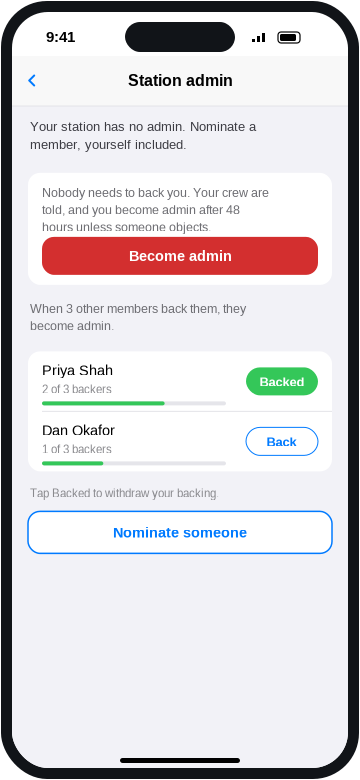
Claim admin yourself
- Tap Become admin, then Claim admin.
- Your crew get a notification and an email saying you've claimed admin.
- If nobody objects within 48 hours, you become admin.
Changed your mind? Tap Withdraw claim. Only one claim can run at a time.
Object to someone's claim
If someone else has claimed admin and you don't think they should have it, tap Object. They won't become admin automatically. Instead they go up for a vote, and nobody can claim admin for 14 days.
Nominate and back someone
- Tap Nominate someone and pick a member. You can pick yourself.
- Other members tap Back next to the person they support.
- When enough other members back them, they become admin. The screen says how many are needed.
Your own backing of yourself doesn't count. On a station where you're the only member, nominating yourself makes you admin straight away.
Vote an admin out
The Admins list shows each admin, marked Inactive if they haven't used iOnCall for a while. Tap Vote to remove next to an admin to vote to take their admin rights away. They stay on the station as crew. If they're the last admin, they stay admin until someone replaces them, by a claim or a nomination.
When your station already has an admin
Nominations and claims are only for stations with no active admin. If your station has one, ask them to make you admin from your profile. For more on how the votes work, see Voting someone in or out as station admin.