
The crew at a station can vote someone in as admin, or vote an admin out, without contacting iOnCall. This article explains how the votes work in the app and on the Station Dashboard.
Where to vote
- In the app on Android: tap the menu button at the top left and choose Station admin. If it isn't in the menu, update the app from Google Play.
- In the app on iPhone: Station admin comes to the menu in the next update. Until then, while your station has no active admin, tap Choose on the amber bar on the Team screen. To vote out an admin while your station still has one, use the Station Dashboard.
- On the Station Dashboard: on the Overview page. While your station has no active admin it's the card at the top. Otherwise the admins are listed under Station admins at the foot of the page.
How many votes it takes
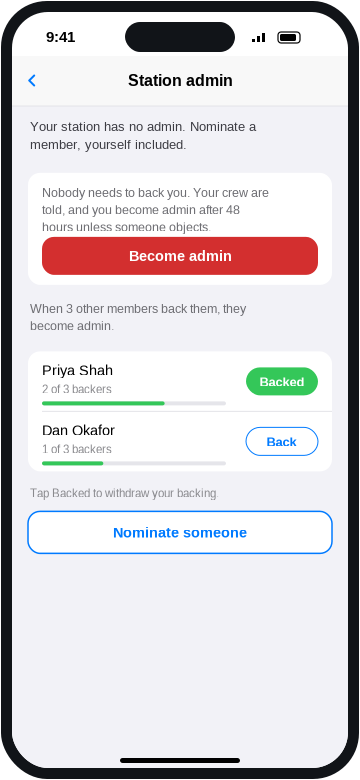
Someone is voted in or out when 3 other members agree. On a station with fewer than 4 members, every other member must agree. The screen shows how far each vote has got, for example 1 of 3.
- Each member counts once, however many times they tap.
- You can't vote for yourself or against yourself.
- If a member leaves the station, their votes stop counting.
Vote someone in
You can only vote someone in while your station has no active admin. That means it has no admin at all, none of its admins has used iOnCall in the last 60 days, or its last admin has been voted out.
- Open Station admin and tap Nominate someone. Pick a member. You can pick yourself.
- Other members tap Back next to the person they support. Tap Backed to take your backing away.
- When enough other members back them, they become admin straight away. Everyone gets a notification.
If your station already has an active admin, nominations are closed. Ask an admin to choose Make admin on your profile in the app, or on the Crew page of the dashboard.
Instead of a vote, a member can also claim admin, and gets it after 48 hours unless someone objects. See When your station has no admin.
Vote an admin out
You can vote an admin out at any time, even if your station has other admins.
- Open Station admin. Admins who haven't used iOnCall for 60 days are marked Inactive.
- Tap Vote to remove next to the admin and confirm.
- Changed your mind? Tap Withdraw vote before the vote carries.
What happens when enough members vote:
- The station has another active admin: the admin rights are taken away straight away.
- They're the last active admin: they keep admin until someone replaces them. Nominations and claims open at once, and when someone is voted in or their claim goes through, the old admin loses their rights at the same moment. A station is never left with nobody in charge.
Being voted out only takes away admin rights. The person stays on the station as crew.
What admins can and can't do
Admins invite and remove crew, send callouts, change station settings and billing, and can edit any member's profile. They can't see a member's hours or availability history. Only the member and the line manager they chose can. See Roles at your station.