
Most people at a station are simply crew. A few have extra jobs on the Station Dashboard. This article explains each role and what it lets someone do.
The roles
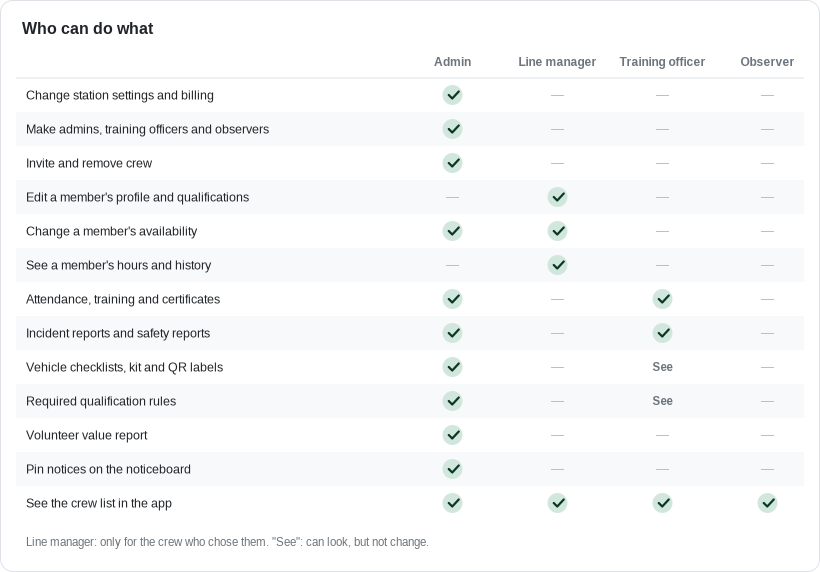
- Station admin: runs the station on the dashboard. Admins change station settings and billing, invite and remove crew, give people roles, and keep the station's records.
- Line manager: chosen by a crew member to look after their availability. A line manager can change that member's availability, edit their profile and see their hours. It only covers the crew who chose them. See Line managers and who can see your plan.
- Training officer: a crew member who keeps the station's records without being an admin. See Training officers.
- Observer: someone who sees the crew list in the app but isn't crew, such as a trustee. Observers are never paged, counted in crewing or billed. See Observers.
One person can hold more than one role. For example, an admin can also be someone's line manager.
Who edits a member's profile
A member's profile (name, rank, crew number, callsign and qualifications) can be edited by the member themselves, by any station admin, and by the line manager they chose.
Seeing a member's hours and availability history is different: only the member and their line manager can. Being an admin doesn't let you see someone's hours.
To edit your own, see Your profile on the dashboard.
Give someone a role
Only station admins can give or take away a role. Go to Crew, choose the ⋮ menu on the person's row, then:
- Make admin or Remove admin,
- Make training officer or Remove training officer,
- Make observer.
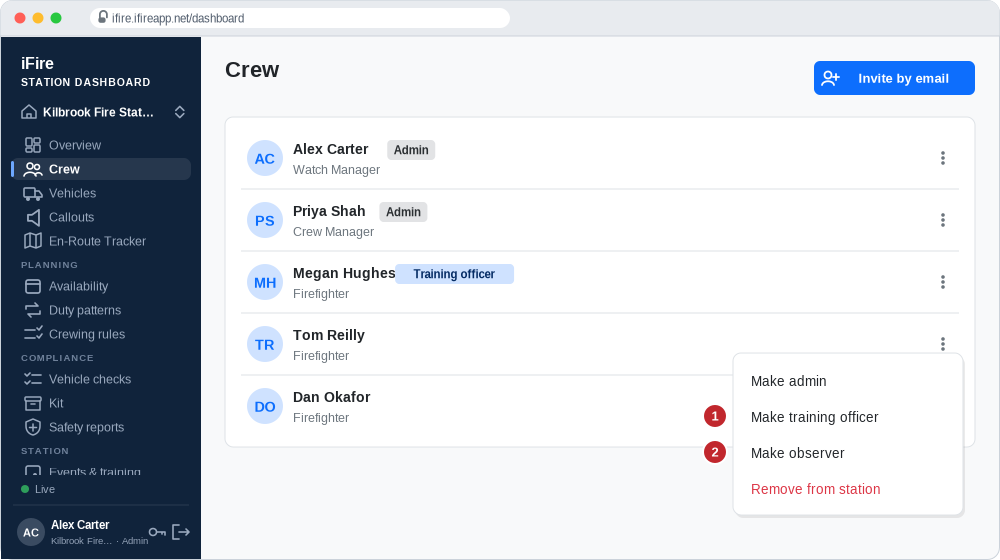
Training officer and observer aren't offered for admins, and nobody can change their own role. A station always keeps at least one admin.
Line manager is different: nobody is made a line manager. Each member chooses their own, on the Crew page, on their profile or in the app.