
Two station settings change what happens after a callout goes out. Both are on Station settings, in the Callouts card. Only station admins can change them; everyone else sees Only station admins can change this.
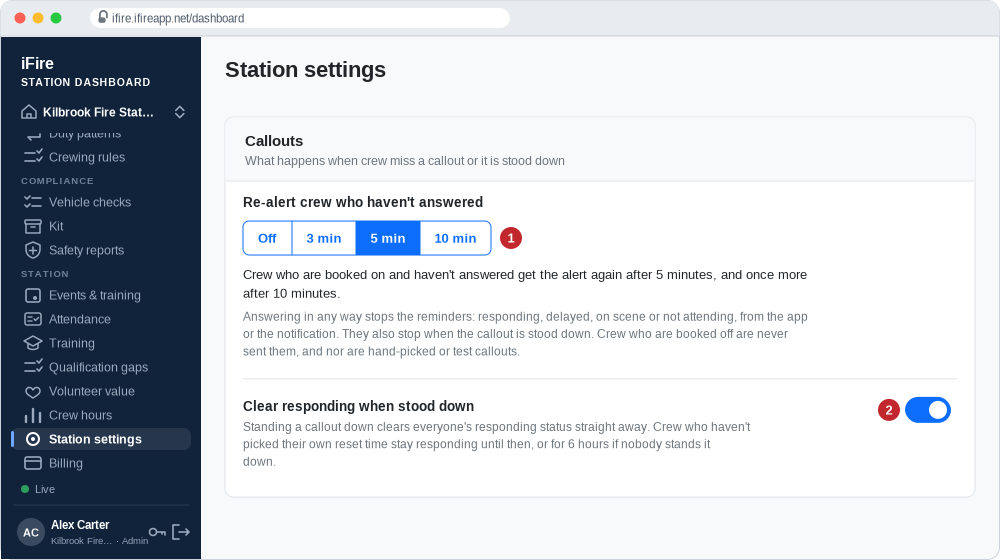
Re-alert crew who haven't answered
A pager message can be missed: a phone in another room, a deep sleep. Under Re-alert crew who haven't answered, pick how soon booked-on crew who haven't answered get the alert again.
- Choose 3 min, 5 min or 10 min. With 5 minutes, unanswered crew get the alert again after 5 minutes and once more after 10.
- Choose Off to send each callout once. This is how every station starts.
The reminders stop for a crew member as soon as they answer in any way: responding, delayed, on scene or not attending, from the app or from the notification. They stop for everyone when the callout is stood down.
Crew who are booked off are never sent reminders, and nor are callouts sent to hand-picked crew or test callouts.
Clear responding when stood down
Normally a responding status clears by itself after the time each crew member picked in the app. Switch on Clear responding when stood down and standing a callout down clears everyone's responding status straight away instead, so the crew board and the app show the station as it really is.
- It works however the callout is stood down: from the app, the dashboard or a partner pager system.
- Crew who haven't picked their own reset time stay responding until the stand down, or for 6 hours if nobody stands it down.
- It's off unless you switch it on.
What crew see in the app is covered in Re-alerts and reminders during a callout. How to stand a callout down is covered in Standing down and the responding log.