
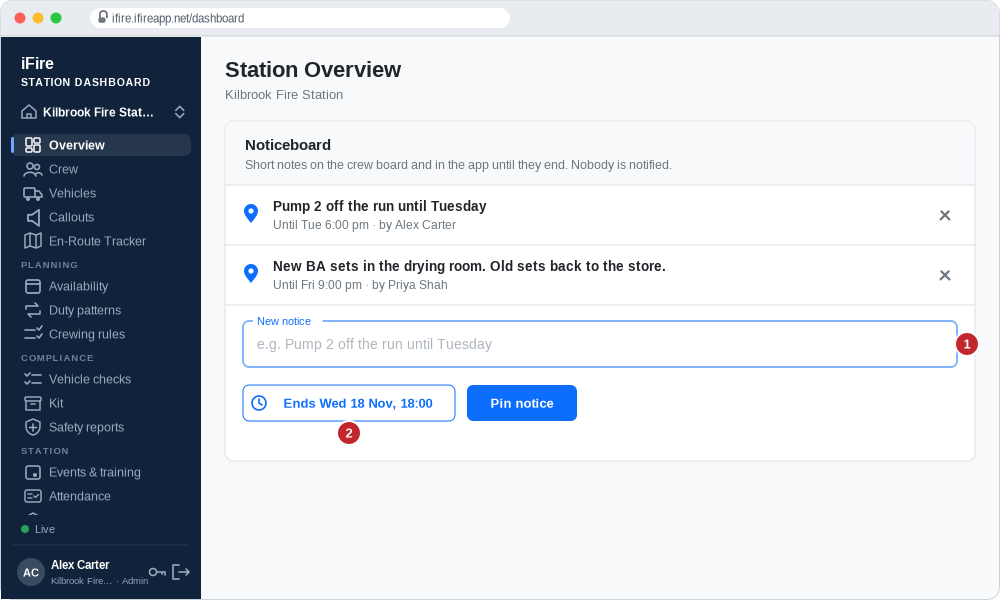
The Noticeboard pins short notes for the whole station, such as Pump 2 off the run until Tuesday. Each notice has an end time and disappears by itself when it ends.
Where notices show
- On the dashboard's Overview page.
- On the crew board in your crew room.
- In the app, on the Team screen. See The station noticeboard.
Nobody is sent a notification when you pin a notice. Use it for things people should see, not things they must act on now. For that, use the station chat or a callout.
Pin a notice (admins)
- Go to Overview and find the Noticeboard card.
- Type the notice in New notice.
- Choose the Ends button to pick the day and time it ends. It starts at 6 pm tomorrow, and must be at least 5 minutes away.
- Choose Pin notice.
Take a notice down early
Choose the Remove cross next to the notice, then Remove to confirm.
Only station admins can pin and remove notices. Everyone else sees Only station admins can pin notices. under the list.