
Vehicle checks (Lifeboat checks on iCrew) gives each vehicle a checklist. Crew work through it in the app, ticking or crossing each line, and the dashboard shows where every vehicle stands.
Station admins set up checklists. Training officers can see the page and the check history.
Add a checklist (admins)
- Go to Vehicle checks. Each vehicle on your Vehicles page has a card.
- Choose Add a checklist on the vehicle's card.
- Type one check per line, in the order crew should do them. A checklist can have up to 40 lines.
- Choose How often it's due: every day, every week, every 2 weeks, every 4 weeks or every 3 months.
- Choose Save.
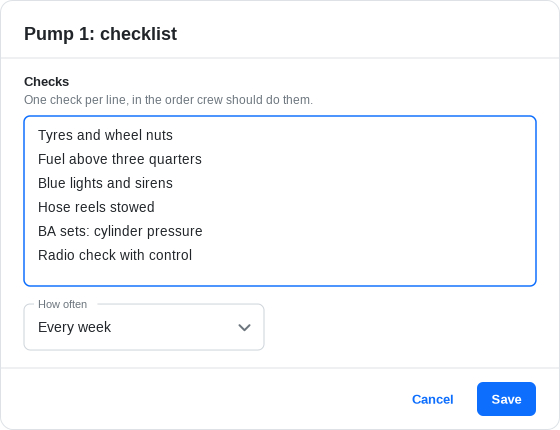
To change it later, choose Edit checklist. Saving an empty list removes the checklist.
Where each vehicle stands
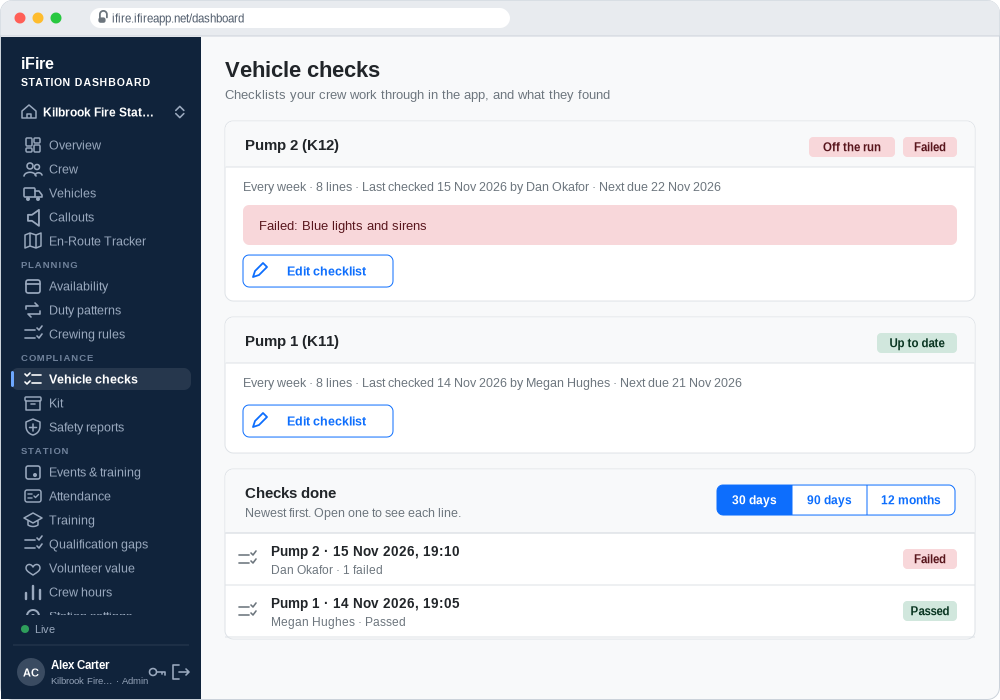
Vehicles that need attention come first. Each card shows one of these:
- Failed: the last check found a problem. The failed lines are listed in red.
- Due: the next check is due.
- Never checked: it has a checklist but nobody has checked it yet.
- Up to date: checked and not due yet.
- No checklist: add one so crew can check it.
When a check fails
If something fails, the crew member doing the check can take the vehicle off the run from the app. It then shows Off the run here and on the crew board, and stops counting towards crewing. When it's fixed, switch it back on from the On the run card on the Vehicles page.
Check history
Checks done lists every check, newest first, for the last 30 days, 90 days or 12 months. Click one to see each line, with any note the crew member added.
How crew do a check
In the app, crew open Vehicles from the side menu, or scan the vehicle's QR label. See Doing a vehicle check. You can print labels from the Kit page.