
You can belong to more than one station, for example a retained station and a second station you cover. Each one has its own crew, chat and alerts.
Switch station
If you belong to more than one, a station icon appears at the top of every tab. Tap it and pick the station you want to act as. Your status changes and plans are for the station you've picked.
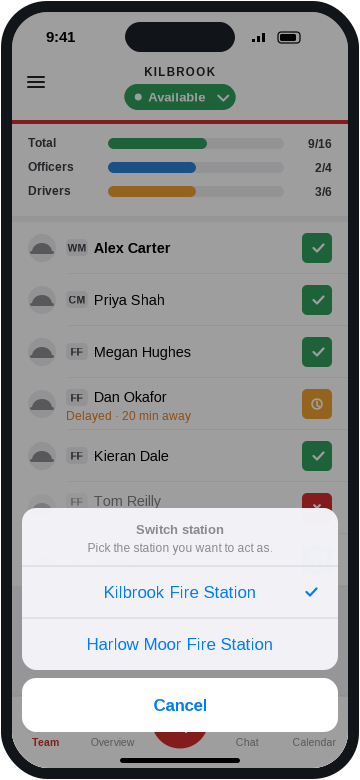
You can also go to Stations in the side menu, tap a station, then tap Set as active station.
Invite someone to your station
Anyone on a station can invite new crew: go to Stations in the side menu, tap the station, then Invite Crew. Share the six-digit code and its link, or let the new member scan the QR code. If your station has fewer than four members, Invite crew members also appears at the bottom of the Team screen. See Inviting crew from the app.
Join another station
- Ask someone on that station for an invite code, link or QR code.
- Open the link on your phone, or go to Stations in the side menu and tap Have an invite code?.
- Type the six digits, or tap Scan invite QR, then tap Join station.
If that station invited you by email instead, make sure they used the email address you sign in with, then go to Stations and tap Check again. More help: Joining your station with an invite code or link.
Create a new station
Some apps show Create a new station on the Stations screen. Give the station a name and timezone and tap Create station. You become its admin and the station gets a free trial. If you don't see it, set the station up on the Station Dashboard: see Setting up a new station.
Leave a station
- Go to Stations in the side menu and tap the station.
- Tap Leave station, then Leave.
You'll stop getting that station's alerts and drop off its crew list. You can rejoin later with a new invite code. If you were its last admin, the longest-standing member becomes admin automatically.
If your station has no admin
An amber bar on the Team screen says Your station has no admin, or Your station has no active admin if its admins haven't used the app or dashboard for a long time. Tap Choose to nominate someone, yourself included, or to become admin yourself. See When your station has no admin.